WordPress database error: [You have an error in your SQL syntax; check the manual that corresponds to your MariaDB server version for the right syntax to use near '' at line 1]SELECT * FROM wp_mica_ecta WHERE cta_id =
WordPress database error: [You have an error in your SQL syntax; check the manual that corresponds to your MariaDB server version for the right syntax to use near '' at line 1]SELECT * FROM wp_mica_ecta WHERE cta_id =
Crypto theft is not slowing down. Security firm CertiK tracked more than $1.3 billion stolen across 344 hacks and scams in just the first half of 2026, and wallet compromise, meaning stolen or mishandled private keys, was the single costliest way attackers got in, responsible for over $444 million of that total.
But theft is only half the story. According to Ledger’s research, somewhere between 2.3 and 3.7 million Bitcoin, up to 18% of every coin that will ever exist, is already gone for good because someone lost their private keys.
That’s the real risk with crypto. It isn’t only thieves. It’s you, a few years from now, staring at an old phone with no idea where you wrote down twelve words. This guide walks you through how to recover your trading account wallet, whatever kind you have and however you lost access.
Before you read further, here’s the honest truth: recovery odds are not the same for every wallet
There's no Call To Action with the ID #0.Key Takeaways
- Your wallet type decides your options. Custodial accounts (like an exchange login) can usually be recovered through identity checks. Non-custodial wallets only come back with your seed phrase. There is no third option.
- Your seed phrase is your real insurance. Most people who lose their crypto for good didn’t get hacked. They lost or damaged their recovery phrase. A $50 metal backup plate fixes this problem forever.
- Verifying your identity now pays off later. Exchanges move much faster to restore accounts for users who already completed identity verification. Do it before you need it, not after.
- Most “recovery experts” are scammers. Anyone who guarantees 100% success or asks for payment before doing any work is not legitimate. Real recovery firms only get paid if they succeed.
Understanding Wallet Types and What They Mean for Recovery
| Custodial accounts, the kind where an exchange holds your funds, can typically be restored within a few days once you verify your identity. Self-custody wallets are a different story entirely. If you have your seed phrase, you’re fine. If you don’t, no company, developer, or support agent can get your funds back. The FBI’s Internet Crime Complaint Center reported that Americans lost over $11 billion to crypto-related fraud in 2025 alone (FBI IC3 2025 Annual Report), and a growing slice of that came from fake “recovery services” preying on people desperate to undo a mistake. Knowing the real recovery process, and knowing what a scam looks like, protects you twice over. |
Before you do anything else, figure out exactly what kind of wallet you’re dealing with. This one fact determines everything else in your recovery path.
Custodial Wallets: When the Exchange Holds Your Keys
A custodial wallet is what most people use without thinking about it. Platforms like UEEx, Binance, Coinbase, and Kraken hold your private keys on your behalf. You log in with a password; the exchange handles the cryptography behind the scenes.
The upside is recovery. Because the exchange controls the keys, it can verify who you are and restore your access, the same way a bank resets a forgotten online banking password. Recovery on a custodial account can take anywhere from fifteen minutes for a simple password reset to a few weeks for a full account restoration involving stolen credentials.
The tradeoff is that you’re trusting a company. Withdrawals are often frozen for 24 to 72 hours after any security change, which is annoying in the moment but exists to stop someone else from draining your account right after you regain access.
Non-Custodial Wallets: When You Hold Your Own Keys
Wallets like MetaMask, Trust Wallet, and Exodus are non-custodial. You, and only you, hold the private keys. Nobody at the company can see your balance, freeze your account, or reset your password in any meaningful sense, because there’s no central account to reset.
This is the appeal of self-custody: nobody can lock you out but you. It’s also the danger. If you lose your seed phrase, the wallet provider has no way to help you. Not because they won’t but because they can’t. The math behind your wallet makes it mathematically impossible to guess your way back in.
Hardware Wallets: Cold Storage With a Physical Backup
Hardware wallets like Ledger and Trezor devices store your keys offline, away from internet-connected malware. If the device breaks, gets lost, or is stolen, your seed phrase (written down separately, ideally) is what brings your funds back onto a new device.
2026 brought real upgrades here. Ledger’s Nano Gen5 now ships with a Ledger Recovery Key, a PIN-protected NFC smart card that stores an encrypted backup of your seed phrase, so you don’t have to rely on paper alone.
Also, Trezor’s Safe 7 introduced a dual secure element design and post-quantum-ready firmware, along with support for Shamir Backup, which splits your seed phrase into several shares so no single piece of paper holds the whole key.
Multi-Signature and Hybrid Wallets
The hybrid or multisig wallets require more than one key to approve a transaction, say, two out of three signers. These are common for businesses, shared family funds, or estate planning, because losing one key doesn’t mean losing the funds.
Recovery here depends entirely on how the wallet was set up, so if you’re managing one, keep documentation of the exact signing structure somewhere safe and separate from the keys themselves.
Wallet Recovery Options at a Glance
| Wallet Type | Recovery Method | Typical Timeline | Cost |
| Custodial (exchange) | Identity verification, password/2FA reset | Minutes to 3 weeks | Free |
| Non-custodial (software) | Seed phrase only | Instant with phrase, impossible without | Free |
| Hardware wallet | Seed phrase, Recovery Key, or Shamir Backup | 15 minutes to a few hours | Free (DIY) |
| Damaged hardware device | Chip-level data recovery | Weeks to months | $300 to $5,000+ |
| Multi-signature | Coordination among key holders | Varies by setup | Free to complex |
Before You Start: What to Do the Moment You’re Locked Out
Steps to take once you’re locked out of your account
Step One: Don’t Touch Anything Yet
The instinct to panic-click through settings makes things worse. Stop, take a breath, and figure out exactly what you lost before you try to fix it.
Ask yourself:
- Is it just my password?
- Did I lose my 2FA device or phone number?
- Do I still have access to my email?
- Do I have my seed phrase anywhere, even an old photo or drawer?
Step Two: Check the Obvious Places First
Before assuming the worst, look through:
- Your password manager
- Old notes apps or physical notebooks
- Cloud backups you may have forgotten about
- A safe, drawer, or filing cabinet where you might have written a phrase down
Step Three: Gather What You’ll Need
Recovery moves faster when you have your paperwork ready before you contact support. Collect:
- Your account email, username, or wallet ID
- A government-issued ID (passport, driver’s license, or national ID)
- Proof of address dated within the last three months
- Screenshots or transaction hashes proving you own the account
- Any 2FA backup codes you saved
- Records of your previous KYC submissions
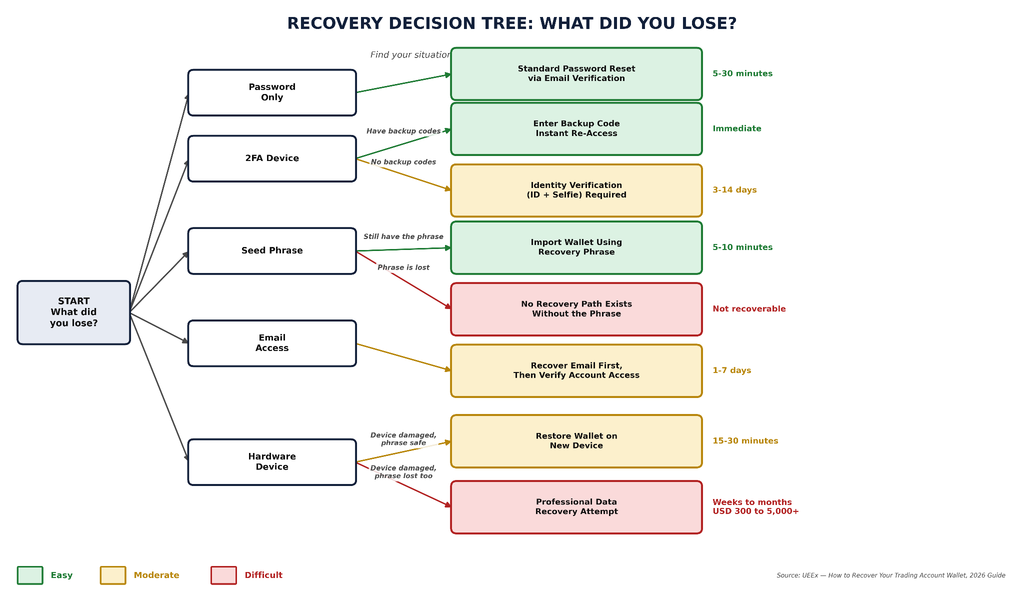
A Simple Decision Tree
- Lost password only → standard password reset
- Lost 2FA device, still have backup codes → instant reset
- Lost 2FA device, no backup codes → identity verification required
- Lost password and 2FA together → full account recovery through KYC
- Non-custodial wallet, seed phrase in hand → self-recovery, no support needed
- Non-custodial wallet, seed phrase gone → funds are very likely unrecoverable
- Hardware wallet damaged, seed phrase safe → restore on a new device
Setting Expectations You Can Live With
Not every recovery ends the same way, and it helps to know that going in.
- Simple password reset: usually under 30 minutes
- 2FA reset with backup codes: instant
- 2FA reset without backup codes: several days to two weeks, depending on the platform’s identity checks
- Hardware wallet restoration with a seed phrase: 15 to 30 minutes
- Professional data recovery on a damaged device: weeks to months, and it isn’t guaranteed
- Non-custodial wallet with no seed phrase: recovery is exceptionally rare
How to Recover Your Trading Account Wallet on an Exchange
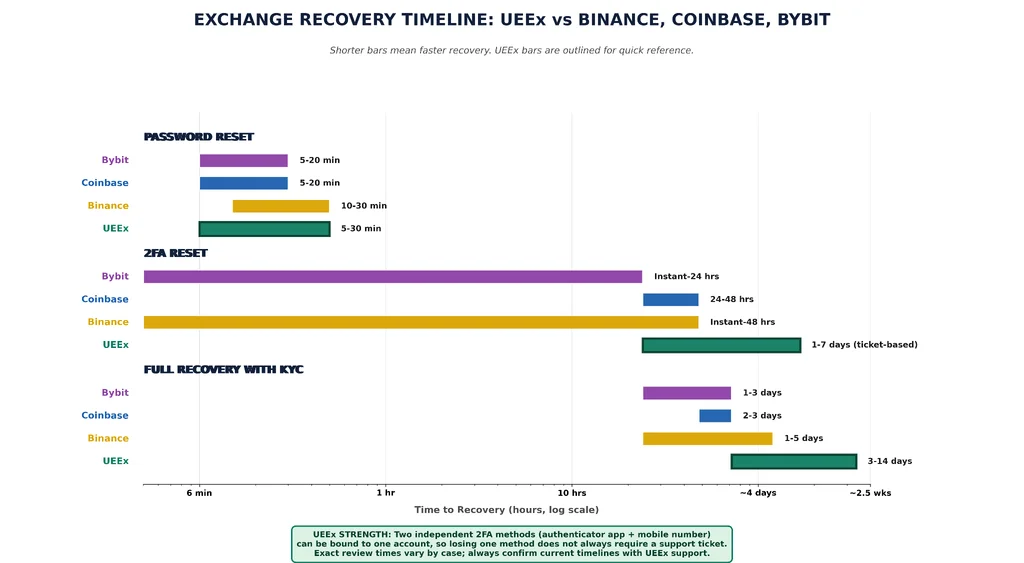
This is the scenario most people search for, and it’s also the one with the best odds. Every centralized exchange handles the details a little differently, so below is a platform-by-platform breakdown. Screens and wording change over time, so always confirm the current steps on the platform’s own help center before you start.
Recovering Your UEEx Account
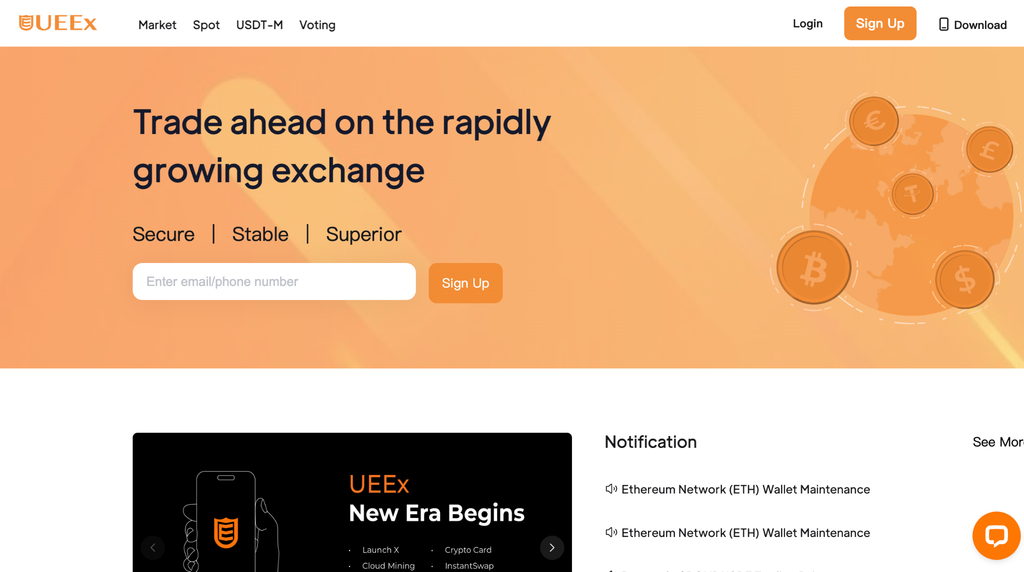
Source: ueex.com
UEEx account recovery runs through two channels: self-service settings while you’re still logged in and a support ticket when you’re locked out entirely.
If you can still log in but need to update your security settings:
- Go to your account’s security settings.
- To change your authenticator app, use the guided flow described in UEEx’s Google Authenticator Binding Tutorial (search “Google Authenticator” from the UEEx Help Center).
- To update your registered phone number, follow the Mobile Number Binding Tutorial, available in the same help center under Account & Security.
- Confirm the change with the verification code sent to your existing email or phone.
If you’re fully locked out (lost password, lost 2FA, or both):
- Go to the UEEx Help Center and select “Submit a Request” to open a support ticket directly with UEEx customer service.
- Explain clearly what you lost: password, authenticator app, phone number, or email access.
- Provide identity verification matching your KYC submission: a government-issued ID and a selfie, plus proof of address if requested.
- Include any details that help confirm ownership: your account email, approximate registration date, recent deposit or trading activity, and your account UID if you have it.
- Wait for the support team to review your ticket. UEEx also lists direct contact through customer-service@ueex.com for account and security issues.
Before you’re ever locked out:
Complete identity verification early through UEEx’s Identity Verification (KYC) section, and bind both an authenticator app and a mobile number to your account. Having two working 2FA methods means a lost phone doesn’t automatically mean a support ticket.
As with every exchange in this guide, expect a temporary withdrawal hold after any password or 2FA change. This is a standard industry safeguard, not something specific to UEEx, and it exists to stop someone else from draining your account in the same window you just recovered it.
Recovering a Binance Account
Source: binance.com/en-NG
Binance leans on a mostly self-service flow, backed by video verification for edge cases.
Standard password reset:
- From the login page, select “Forgot Password.”
- Verify through your registered email.
- Set a new password.
Self-service 2FA reset (if you still have partial access):
- On the 2FA screen, select “Security verification unavailable?”
- Choose which 2FA method you’ve lost access to.
- Verify through whatever method you still control (email, another 2FA device, or ID verification).
- Submit the reset request. Binance typically completes automated reviews within 48 hours, though manual review can take longer.
Full reset with no working 2FA methods:
Binance requires a short verification video. You’ll film yourself holding your ID and reading a scripted statement that includes the current date and your account email, then submit it alongside a photo of your ID.
This is a documented Binance procedure, not an unusual request, so don’t be surprised by it. Withdrawals, P2P selling, and card services are disabled for 48 hours after any 2FA reset on Binance, regardless of which method you use.
Recovering a Coinbase Account

Source: Pinterest
Coinbase’s recovery flow is built around its help center rather than manual ticket submission for most cases.
Password reset:
- Go to the Coinbase sign-in page and enter your email.
- Follow the reset link sent to your inbox.
- Set a new password.
Lost 2FA device:
- On the 2FA prompt, select “Having trouble with your 2FA?” or “Try another way.”
- If your phone number is still active, you may be able to receive a recovery code by SMS instead.
- If not, go to Coinbase’s official contact page, choose “Unable to log in,” then “I have lost my 2FA device.”
- Upload a government-issued ID for identity verification.
Coinbase generally resolves straightforward 2FA resets within 24 to 48 hours, though manual reviews during high-volume periods can take longer. One important warning: search results for “Coinbase support phone number” are flooded with scam listings posing as customer service.
Coinbase support is only reachable through help.coinbase.com. Never call a number you found in a random forum post or comment section.
Recovering a Bybit Account
Source: bybit.com/en/
Password reset: Use the “Reset Password” option on the login page, verified through your registered email.
Self-service 2FA unbind (recommended first step):
- On the 2FA verification screen, select “Having problems with verification?”
- Choose the method you’ve lost: Google Authenticator, mobile number, or email.
- Verify using whichever method you still control.
- Complete any additional identity check requested, which may include facial verification for higher-risk changes.
If self-service doesn’t work:
Submit a request directly through Bybit’s Customer Support form. Most cases are reviewed within one to three working days, and you’ll get an automated case number by email right after submitting.
Bybit strongly recommends saving your Recovery Key Phrase (RKP) the moment you first bind Google Authenticator, since it speeds up rebinding on a new device without needing a full support review at all.
Exchange Recovery Comparison
| Exchange | Self-Service 2FA Reset | Manual Review Time | Verification Video Required |
| UEEx | Limited (email/phone rebinding while logged in) | Varies by ticket | Sometimes, for full lockouts |
| Binance | Yes, with fallback to manual review | Up to 48 hours (automated); longer if manual | Yes, if no 2FA method remains |
| Coinbase | Yes, via help center flow | 24 to 48 hours typical | No, ID upload instead |
| Bybit | Yes, via “Having problems with verification” | 1 to 3 working days | Sometimes, for facial verification |
Self-service options exist for a reason. They’re faster than a support ticket every time, so always check for one before you open a case.
What to Expect Across Every Exchange
- Withdrawals are almost always frozen for 24 to 72 hours after any password or 2FA change. This isn’t a bug but the industry standard.
- Most platforms require identity verification on file before they’ll restore access at all.
- If you suspect your account was compromised rather than just locked, say so explicitly in your support request and ask for an immediate freeze while it’s investigated.
- Never submit duplicate tickets for the same issue. It resets queue position on some platforms and slows everyone down, including you.
Recovering a Non-Custodial Wallet
| Can you recover a non-custodial wallet without a seed phrase? No. If you have your seed phrase, recovery takes minutes. If you don’t, there is no backup method, no customer support line, and no workaround that gets your funds back. |
What a Seed Phrase Actually Is
Your seed phrase is a string of 12 to 24 words drawn from a standardized list of 2,048 words, defined by the BIP39 specification. Think of it as the master key. It generates every private key in your wallet, and because it follows an open standard, the same phrase works across compatible wallets from different companies.
Order matters completely. “Apple, banana, cherry” is not the same seed as “cherry, banana, apple.” Even one word out of place, or one word misspelled, produces a completely different wallet.
MetaMask Wallet Recovery
The MetaMask Help Center recommends restoring a wallet with its Secret Recovery Phrase (SRP) or, for eligible newer wallets, the associated Google, Apple, or Telegram login.
There's no Call To Action with the ID #0.Recovery With a Secret Recovery Phrase
- Download MetaMask from its official website or app store.
- Select “I have an existing wallet” on a fresh installation.
- Choose “Import using Secret Recovery Phrase” and enter all 12 words in the correct order.
- Set a new password to protect the wallet on that device.
- Re-add any networks, tokens, or accounts that do not automatically appear.
Important: Accounts imported with separate private keys or other recovery phrases may need to be restored manually.
Password vs. Recovery Phrase
- Password: Protects access to the MetaMask installation on your device.
- Secret Recovery Phrase: Restores the wallet and its associated accounts.
- Forgotten password: You can regain access if you still have the SRP.
- Lost SRP: MetaMask cannot retrieve it for you. Never share it with support or anyone else.
If you can still access the wallet, back up the SRP immediately and store it offline. Anyone who obtains it can control the wallet.
Trust Wallet Recovery
Standard Recovery
To restore a Trust Wallet:
- Install the official Trust Wallet app.
- Select the option to “import or restore an existing wallet.”
- Enter your recovery phrase in the exact order provided.
- Complete the app’s security setup.
The recovery phrase is the key to restoring the wallet. Keep it private and never enter it into websites or send it to anyone claiming to offer recovery assistance.
Multi-Chain Assets
A single recovery phrase can restore accounts across multiple supported networks, but the assets may not immediately appear in the interface. You may need to enable the relevant token or network manually before seeing the balance.
Exodus Wallet Recovery
Exodus Support: Wallet Recovery confirms that a 12-word secret key can restore an Exodus wallet on another device.
- Install the latest Exodus app.
- Choose the “restore” option.
- Enter your 12-word secret key in the correct order.
- Allow the wallet to complete synchronization.
- Check your assets and transaction history.
Exodus also supports certain passkey and cloud-backup recovery options, but these must have been configured beforehand. Restoring a wallet can overwrite the wallet currently on the device, so back up any existing wallet first.
Bottom line: For all three wallets, your recovery phrase remains the most important backup. Store it offline, never share it, and avoid entering it into unverified websites or apps.
Recovering a Hardware Wallet
Hardware wallets are the gold standard for security, but recovery still comes down to one thing: do you have your seed phrase or a compatible backup?
Ledger Recovery
Standard seed phrase restore
Connect a new or reset Ledger device, choose “Restore from recovery phrase,” select 24 words, and enter them using the device’s screen. The device checks the phrase automatically. Set a new PIN, and your accounts are back. This usually takes 15 to 30 minutes.
Ledger Recovery Key (Nano Gen5 and newer)
If you set one up in advance, tap the included NFC smart card to your device, enter its PIN, and your seed restores in a couple of minutes. This only works if you activated the card before you lost access, so it’s worth setting up the day you unbox a new device, not after something goes wrong.
Damaged device, seed phrase lost too
This is where things get expensive and uncertain. Professional data recovery firms can sometimes extract data from a damaged chip, but success is far from guaranteed, and costs commonly run from $500 to several thousand dollars with no promise of results.
Trezor Recovery
Standard restore
Connect your device, select “Recover wallet,” choose your phrase length, and enter the words on the device’s own screen rather than your keyboard, which is meaningfully more secure. This takes 15 to 25 minutes.
Shamir Backup (Model T and Safe 7)
If your seed was split into multiple shares, you’ll need to enter the required threshold, say three out of five, in sequence. This is common for people who want to distribute pieces of their backup between family members or locations without any single person holding the full key.
Passphrase-protected wallets
If you added an optional 25th word during setup, you’ll need to enter it separately after the standard recovery, and it’s case-sensitive. Forgetting the passphrase means losing access to that specific hidden wallet, even with the correct 24 words.
A Word on Damaged Devices
If your hardware wallet physically breaks but your seed phrase is intact, don’t panic. Buy a replacement device (it doesn’t need to be the same brand, since BIP39 phrases work across compatible wallets) and restore normally.
The device itself was never where your funds “lived.” It’s just the tool that signs transactions using keys derived from your phrase.
Fixing 2FA Problems
Here’s how to fix two-factor authentication (2FA) problems
Backup Codes Are Your Fastest Way Back In
When you first set up two-factor authentication, most platforms hand you a set of one-time backup codes, usually ten of them. If you saved these somewhere separate from your device, recovery is nearly instant: enter one code, log in, and then immediately disable and reset your 2FA with a new device.
No Backup Codes? Here’s What Happens Next
Without backup codes, you’re back to identity verification. Prepare the same documents mentioned earlier: government ID, a selfie holding that ID with a handwritten note, and proof of address if requested.
Review windows vary by platform, but a few days to two weeks is typical for standard accounts and faster for accounts with higher-tier verification already on file.
If You Use Authy
Authy backs up your 2FA codes to the cloud by default, which makes recovery easier than app-only alternatives. On a new device, enter your phone number, verify by SMS, and enter your Authy account password. If you’ve forgotten that password, though, the encrypted backup can’t be recovered by anyone, including Authy itself.
What to Do If Your Account Is Hacked
Steps to take once you discover that your account has been hacked
Warning Signs You Shouldn’t Ignore
- Login alerts from a device or location you don’t recognize
- A password reset email you didn’t request
- Withdrawals or trades you didn’t make
- Your 2FA suddenly stops working
- You can’t log in even though your password is definitely correct
The First Five Minutes Matter Most
- Try logging in from a device you know is secure, and use backup codes if needed.
- If the platform has a “freeze account” option, use it immediately.
- Contact support through official channels only, stating clearly that you suspect unauthorized access.
- Secure your email and phone separately. Change your email password, check for forwarding rules you didn’t set up, and call your mobile carrier to guard against a SIM swap.
- Screenshot everything: alerts, transaction IDs, timestamps.
The Next 24 Hours
Submit a formal account freeze request, gather every piece of ownership proof you have, and, if the loss is significant, file a report with the FBI’s Internet Crime Complaint Center at ic3.gov.
Reporting doesn’t guarantee your funds come back, but it creates a paper trail that sometimes helps investigators trace stolen funds to an exchange, where law enforcement can occasionally freeze them before they’re cashed out.
If recovery succeeds, move your funds to a brand-new wallet with new credentials right away. Don’t reuse anything from the compromised account.
Spotting Fake Recovery Services
This is the part of the guide that saves people real money, so read it carefully.
The Scam Recovery Industry Is Bigger Than You’d Think
The FBI’s most recent IC3 Annual Report, covering 2025, logged more than 10,500 complaints tied specifically to fake recovery services impersonating law firms, government agencies, and even IC3 itself, adding up to roughly $1.4 billion in losses.
These scammers specifically target people who already lost money once, which makes the emotional pull to “just try anything” incredibly dangerous.
Red Flags That Mean Walk Away
- They contact you first, out of nowhere, through social media or a random email
- Communication only happens through Telegram, WhatsApp, or a personal Gmail address
- They promise a guaranteed or “100% success” recovery
- They claim they can recover a non-custodial wallet without your seed phrase (this is not possible, full stop)
- They ask for payment before doing any work
- There’s pressure to act fast, “this offer expires today”
- They ask for your seed phrase or private keys directly
No legitimate recovery service will ever ask for your seed phrase. If they ask, the conversation is already over.
What a Legitimate Service Actually Looks Like
- A verifiable business address, phone number, and registration
- A free case evaluation before any payment changes hands
- A contingency fee structure, typically 10% to 20%, paid only after successful recovery
- A written contract explaining the method and realistic timeline
- Independent reviews you can actually verify, not just testimonials on their own site
For amounts under a few thousand dollars, professional recovery usually isn’t cost-effective anyway, since the fee structure and time investment rarely make sense at that scale.
If You’ve Already Been Scammed
Report it to the platform where you were contacted, file a report with the FBI’s IC3, and file a separate complaint with the Federal Trade Commission at reportfraud.ftc.gov. Keep every screenshot, transaction hash, and message.
It won’t always get your money back, but it helps investigators build cases against repeat offenders, and it might stop the next person from falling for the same setup.
How to Never Lose Access Again
These steps will safeguard you from losing your account wallet access
Seed Phrase Storage That Actually Holds Up
Paper works, but it burns, floods, and fades. If you’re holding any meaningful amount of crypto, a metal backup plate is worth the $50 to $150. Products like Cryptosteel or Billfodl survive fire and water in ways a notebook never will.
Whatever material you choose, follow the same rules:
- Never store it digitally. No photos, no cloud storage, no emails to yourself.
- Keep at least two copies in different physical locations.
- Test the recovery process on a small amount before you trust it with everything.
- Never store the phrase in the same place as the hardware wallet itself.
Password and 2FA Habits Worth Building
- Use a password manager and generate a unique, random password for every exchange.
- Save 2FA backup codes in three places the moment you get them: a password manager, a printed copy in a safe, and an encrypted USB drive.
- Prefer an authenticator app over SMS-based codes, since SMS is vulnerable to SIM swap attacks.
- For serious holdings, a hardware security key like a YubiKey offers the strongest protection against phishing.
A Simple Maintenance Routine
- Monthly: Check your login history and active sessions on every exchange you use.
- Quarterly: Confirm your backups are still readable and your documents are current.
- Yearly: Actually test a full wallet recovery and review who would access your crypto if something happened to you.
Want the full checklist? Our Crypto Wallet Security Best Practices Guide covers backup storage, device maintenance, and phishing prevention in more depth than we have room for here.
Why Identity Verification Actually Helps You Recover Your Trading Account Wallet
It’s easy to see KYC (know your customer) verification as a compliance hurdle, but it’s also the single biggest factor in how fast you get your account back.
Exchanges with your verified ID, address, and selfie on file can confirm you’re really you far faster than an exchange working from scratch during a crisis. A verified account with a video call option available tends to move through 2FA resets in days rather than weeks.
An account with no verification at all may not be recoverable through identity checks at all, since there’s nothing to confirm you’re the rightful owner. The smart move is completing verification the day you open an account, not the day you get locked out of it.
Our Account Verification Guide covers exactly what documents to prepare and how to keep them current.
FAQs
What’s the difference between custodial and non-custodial wallet recovery?
A custodial wallet, like an exchange account, can usually be recovered through identity verification because the platform holds your keys. A non-custodial wallet, where you hold your own keys, can only be recovered with your seed phrase. There’s no support ticket or identity check that can substitute for it.
Can I recover my wallet if I’ve lost both my password and my 2FA device?
Yes, on a custodial exchange. You’ll go through a full identity verification process, usually involving a government ID, a selfie, and proof of address, and it typically takes anywhere from several days to a few weeks. On a non-custodial wallet, your password only ever protected local device access, so if you still have your seed phrase, you can restore everything on a new device in minutes.
Are professional crypto recovery services legitimate, or are they all scams?
Some are legitimate, but scams vastly outnumber them. Real recovery firms offer a free case evaluation, charge only on success (typically 10% to 20% of recovered funds), and never ask for your seed phrase upfront. Any service demanding payment before starting work, or guaranteeing 100% success, should be treated as a scam.
How long does exchange account recovery typically take?
A simple password reset can take under 30 minutes if you still have email access. A 2FA reset without backup codes usually takes several days to two weeks. Full account recovery without email access can take one to three weeks, since exchanges intentionally move carefully to avoid handing an account to the wrong person.
Disclaimer: This content is for educational purposes only and does not constitute financial, legal, or investment advice. Crypto wallets carry real risk of permanent loss if backup procedures aren’t followed correctly. Always verify recovery procedures directly with official platform documentation, test recovery methods before funding a wallet with significant value, and consult a qualified professional for high-value holdings. UEEx is not responsible for lost funds resulting from improper backup practices or lost credentials.