WordPress database error: [You have an error in your SQL syntax; check the manual that corresponds to your MariaDB server version for the right syntax to use near '' at line 1]SELECT * FROM wp_mica_ecta WHERE cta_id =
WordPress database error: [You have an error in your SQL syntax; check the manual that corresponds to your MariaDB server version for the right syntax to use near '' at line 1]SELECT * FROM wp_mica_ecta WHERE cta_id =
WordPress database error: [You have an error in your SQL syntax; check the manual that corresponds to your MariaDB server version for the right syntax to use near '' at line 1]SELECT * FROM wp_mica_ecta WHERE cta_id =
WordPress database error: [You have an error in your SQL syntax; check the manual that corresponds to your MariaDB server version for the right syntax to use near '' at line 1]SELECT * FROM wp_mica_ecta WHERE cta_id =
In February 2025, hackers linked to North Korea broke into Bybit, one of the world’s largest crypto exchanges, and walked away with about $1.5 billion in Ethereum. It remains the largest single crypto theft ever recorded.
Currently, total losses across the crypto industry have already crossed $1.3 billion in the first half of 2026 from 344 separate incidents, according to blockchain security firm CertiK.
Here’s the part that surprises most people: the technology to keep crypto safe has never been better. Hardware wallets, multi-signature setups, and simple habits like verifying an address before you send money can stop almost every attack in the news.
The gap between losing your savings and sleeping soundly at night isn’t luck. It’s knowing how to unlock and secure crypto assets the right way, which is exactly what this guide walks you through, step by step, in plain English.
If you’re brand new to this space, it helps to first understand what cryptocurrency actually is and how blockchain works before diving into wallet security.
There's no Call To Action with the ID #0.Key Takeaways
- Get a hardware wallet if you hold more than a few thousand dollars in crypto. It costs $50 to $200 and keeps your private keys off the internet completely.
- Your seed phrase is the only thing that matters. Write it on paper, store it somewhere safe, and never type it into a computer or phone.
- Always check transaction details on your wallet’s screen, not just your computer screen. This one habit would have stopped some of the biggest hacks in crypto history.
- Don’t put all your eggs in one basket. Split your crypto between cold storage, an everyday wallet, and an exchange, based on how often you need to use it.
- Threats change every year. What tricked people in 2023 won’t look the same in 2026. Stay a little paranoid and keep learning.
How Crypto Wallets Actually Work
Before you can protect your crypto, you need to understand what you’re protecting.
The Safe Analogy
Think of your crypto wallet like a safe with a mail slot.
- Public key = your mailing address. You can hand this out freely. People use it to send you crypto, the same way someone uses your address to mail you a package.
- Private key = the combination to your safe. This is a secret code that proves the crypto inside is yours. If someone else gets it, they can empty the safe. You never, ever share it.
- Seed phrase = the master backup for your safe combination. It’s a list of 12 or 24 ordinary words. These words can rebuild your private key on any device, which means they’re also the one thing that can restore your entire wallet if your phone or hardware device is lost, stolen, or broken.
Why This Is Different from Your Bank
With a bank, if you forget your password, you call customer service, prove who you are, and get back in. Crypto doesn’t work that way.
There is no customer support line for a lost private key. No amount of ID verification, phone calls, or legal paperwork can undo a lost seed phrase. The math simply doesn’t allow it, which is what makes self-custody both powerful and unforgiving.
A private key is a random 256-bit number. That means there are more possible private keys than there are atoms in the observable universe.
Guessing one by brute force isn’t just hard; it’s practically impossible with any computer that exists today, including quantum computers currently in development. This is good news for your security, but it also means there’s no back door for you either. Lose the key, lose the funds.
The Different Ways to Store Your Crypto
Not all wallets are built the same, and picking the right one depends on how you actually plan to use your crypto.
1. Custodial Wallets (Exchanges Like Coinbase, Kraken, or UEEx)
An exchange holds your private keys for you. You log in with a username and password, similar to online banking.
- Good for: active trading, small amounts you use often
- Risk: you’re trusting the exchange’s security. When an exchange gets hacked, like Bybit did, customer funds can be at risk
- Rule of thumb: don’t keep your life savings sitting on an exchange, no matter how much you trust it
2. Hot Wallets (Software Wallets You Control)
Apps like MetaMask, Trust Wallet, Exodus, and Phantom let you hold your own keys on your phone or computer.
- Good for: everyday use, connecting to apps, buying NFTs, using DeFi
- Risk: phishing sites, malware, and fake browser extensions specifically target these wallets
- Rule of thumb: keep amounts here that you’d be okay losing if your device were compromised, generally under a few thousand dollars
3. Cold Wallets (Hardware Devices)
Devices like the Ledger Nano X or Trezor Safe 5 keep your private key on a small offline chip. It is always offline and never touches the internet, even when you’re approving a transaction.
- Good for: long-term holdings, anything over a few thousand dollars
- Risk: low, as long as you buy directly from the manufacturer and guard your seed phrase
- Cost: $50 to $300, which is nothing compared to what it protects
4. Paper Wallets
Private keys written or printed on paper. These were popular years ago but have mostly been replaced by hardware wallets, which offer the same offline protection with far better usability and backup options.
5. Multisig and MPC Wallets (For Larger Holdings)
For businesses, DAOs, or anyone managing serious money, two advanced setups are worth knowing:
- Multisignature (multisig): requires multiple people to approve a transaction before it goes through, like needing 3 out of 5 signatures on a check
- Multi-Party Computation (MPC): splits your private key into pieces held by different parties, so no single device or person ever holds the whole key
Worth noting: Bybit used a multisig setup and still lost $1.5 billion because the attackers tricked the human signers, not the cryptography itself. Multisig only works if every signer actually checks what they’re approving on their device screen, not just on their computer.
There's no Call To Action with the ID #0.A Simple Way to Split Your Holdings
A common approach among experienced holders looks something like this:
| Portfolio Slice | Wallet Type | Purpose |
| 70-90% | Hardware wallet | Long-term storage, rarely touched |
| 5-20% | Software wallet | DeFi, monthly transactions |
| 5-10% | Exchange | Active trading, quick access |
For example, someone holding $50,000 might keep $40,000 on a hardware wallet at home, $7,500 in MetaMask for occasional DeFi activity, and $2,500 on an exchange for trading. A backup hardware wallet, stored at a family member’s house, adds a safety net in case the primary one is lost.
How to Unlock and Secure Crypto Assets: Step-by-Step Access and Recovery
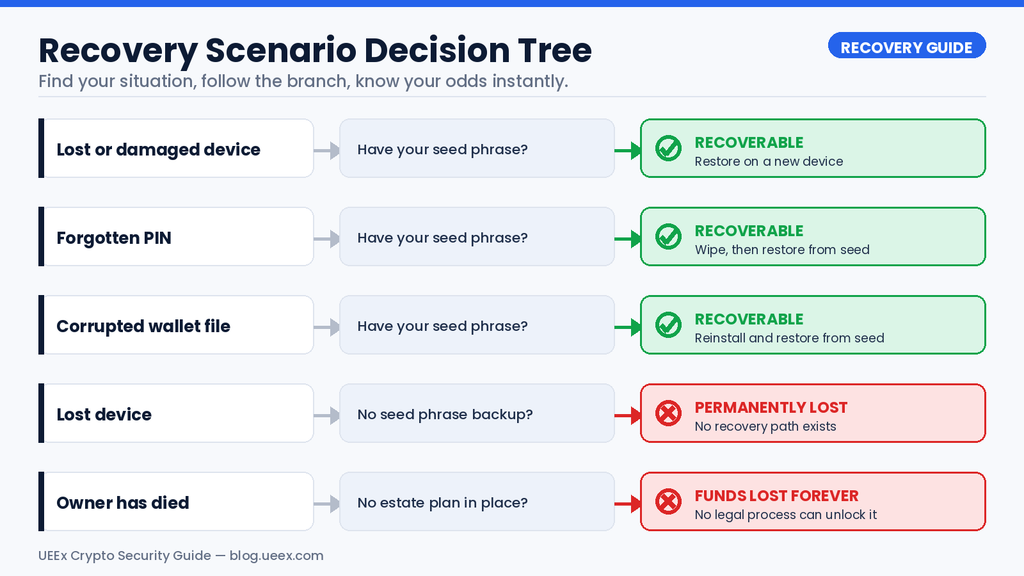
This section covers the actual mechanics of getting into your wallet, whether it’s a routine login or a full recovery after losing a device.
Unlocking a Hardware Wallet (Ledger, Trezor, and Similar Devices)
The everyday process is simple:
- Plug the device into your computer or connect it via Bluetooth.
- Enter your PIN directly on the device (not your computer).
- Open the companion app, like Ledger Live or Trezor Suite.
- Before sending anything, double-check the address and amount on the device’s own screen.
Most hardware wallets wipe themselves after three wrong PIN attempts, on purpose. That’s not a flaw; it’s a defense against someone stealing your device and guessing their way in. If that happens, you’re not out of luck. You simply buy a new device (any brand that supports the BIP39 standard will work) and restore it using your seed phrase.
Unlocking a Software Wallet (MetaMask, Trust Wallet, Exodus)
Here’s a distinction that trips people up: your wallet password and your seed phrase are not the same thing.
- Your password only unlocks the app on that specific device.
- Your seed phrase is the master key that can rebuild your entire wallet on any device, anywhere.
If you forget your password but still have your device, most wallets let you reset it using your seed phrase. If you lose the device entirely, you install the wallet app fresh on a new phone or computer and choose “import wallet” or “restore from recovery phrase,” then type in your words in the exact order they were given.
What to Do If You Lose Your Hardware Wallet
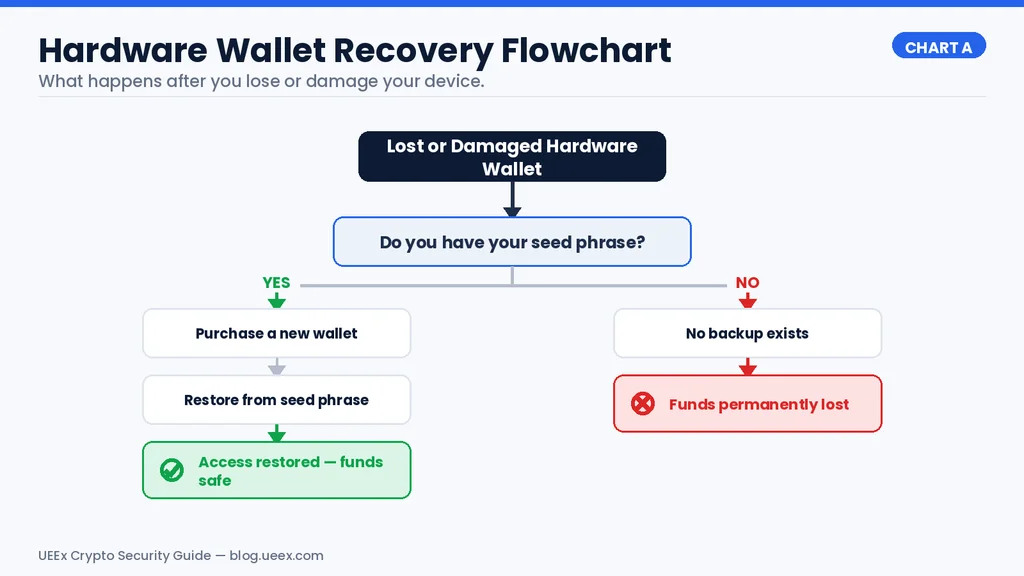
Don’t panic. Losing the device itself doesn’t mean losing your crypto, as long as you have your seed phrase.
- Buy a replacement device (same brand or a different BIP39-compatible one).
- Choose “restore from seed phrase” during setup.
- Enter your words in order.
- Check that the very first receiving address matches an old transaction you can see on a blockchain explorer. If it matches, everything is intact.
If the old device was stolen rather than simply lost, treat the seed phrase as compromised. Set up a brand-new wallet with a brand-new seed phrase and move your funds over immediately, since a thief who has the device may also have found the paper backup.
Emergency Recovery for Software Wallet Issues
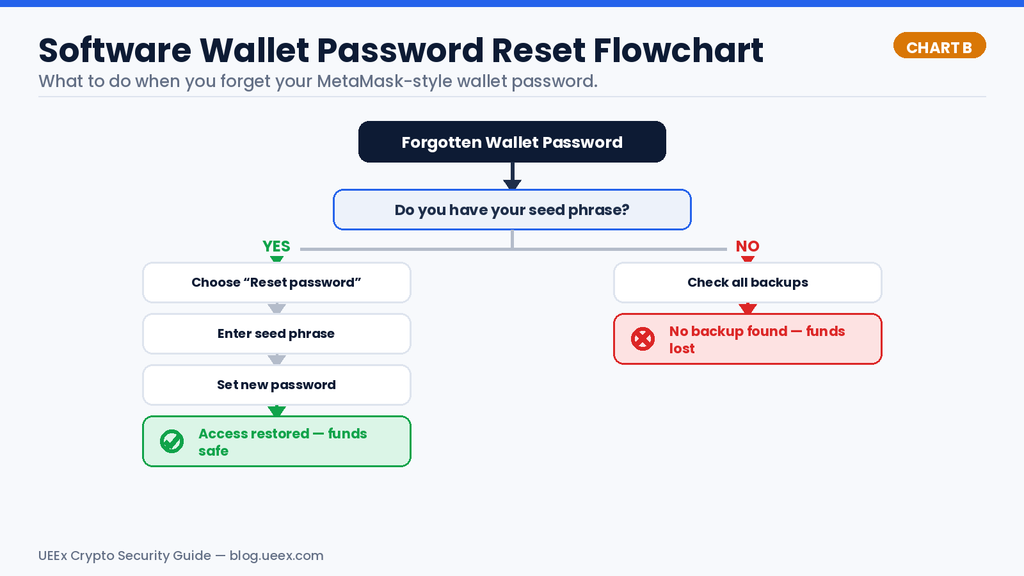
- Forgot your MetaMask password? Click “forgot password,” enter your 12-word recovery phrase, and set a new one.
- Corrupted wallet file (Bitcoin Core, Electrum)? These wallets can usually be restored from your seed phrase on a fresh install, which sidesteps file corruption entirely.
- Inherited a wallet from a family member? Without their seed phrase, there is unfortunately no legal document, court order, or customer service call that can unlock it. This is exactly why estate planning for crypto matters, which we cover further down.
What to Do If You Lose Your Seed Phrase But Still Have Access
This is the one scenario where speed really matters. If you can still open your wallet but can’t find your written backup:
- Do not log out or disconnect the device yet.
- Create a brand-new wallet, which generates a new seed phrase.
- Write the new phrase down immediately, on paper, in a safe place.
- Move every asset from the old wallet into the new one.
- Only then can you relax.
Think of it like realizing you’ve lost your house keys while you’re still standing inside. You have a window to fix the problem before the door locks behind you. Once your only access point disappears, there’s no way back in.
Setting Up a Hardware Wallet the Right Way
Since hardware wallets are the backbone of good crypto security, it’s worth walking through setup carefully. Rushing this step is where most mistakes happen.
Buying Your Device
- Only buy directly from the manufacturer’s official website. Third-party marketplaces occasionally sell tampered devices.
- Check the tamper-evident seal on the box when it arrives.
- On first boot, the device should walk you through generating a brand-new seed phrase. If it already has one pre-loaded, do not use it. Contact the manufacturer.
Generating and Storing Your Seed Phrase
- Write each word down on paper, in order, using the card provided.
- Never photograph it, screenshot it, type it anywhere, or store it in cloud storage like iCloud or Google Drive.
- Keep it in a fireproof safe.
- Make a second copy and store it somewhere geographically separate, like a bank deposit box or a trusted family member’s home.
Choosing a PIN
Pick something random, not your birthday or a repeating sequence. Store it somewhere separate from your seed phrase so that finding one doesn’t give someone access to both.
Optional: The Passphrase Feature
Some wallets, including Trezor devices, support an extra “25th word” on top of your seed phrase. This creates an entirely separate hidden wallet. Some users keep a small decoy amount on the standard 24-word wallet and their real holdings behind the passphrase.
It’s a powerful feature, but losing the passphrase means losing that wallet permanently, so only use it if you’re confident you’ll remember it or can store it securely apart from your main backup.
Test Before You Trust It
Send a small amount, like $10, to your new wallet first. Confirm it arrives. Then try restoring it on a second device using your seed phrase, just to prove to yourself the backup actually works. It’s much better to catch a mistake now than after you’ve moved your life savings.
Read Also: How to Set Up a Hardware Wallet: Everything You Need to Know
Building Real Defense: Layered Security That Actually Works
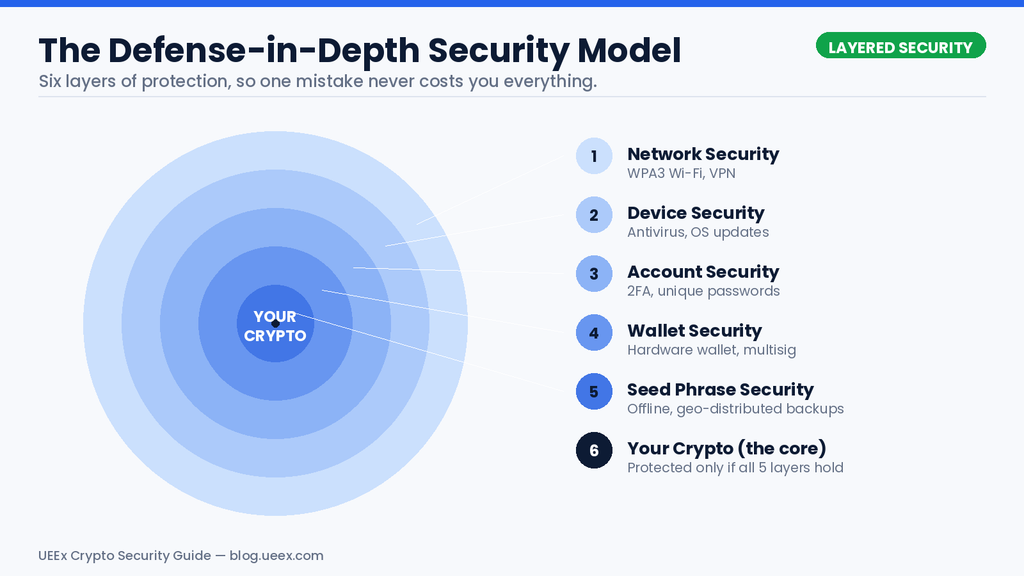
No single tool keeps you 100% safe. Real security comes from stacking multiple layers so that even if one fails, the others hold.
Device security
- Use a hardware wallet for anything valuable.
- Keep a dedicated computer or browser profile just for crypto, free of pirated software or random downloads.
Network security
- Use a secure home Wi-Fi network with WPA3 encryption.
- Never approve transactions over public Wi-Fi.
Account security
- Use an authenticator app like Google Authenticator or Authy for two-factor authentication, never SMS. SIM-swap attacks make text-message codes dangerously easy to intercept.
- Use a password manager and unique passwords for every crypto-related account.
- Turn on withdrawal whitelists on any exchange you use so funds can only leave to pre-approved addresses.
Habits that matter more than any tool
- Always verify the receiving address on your hardware wallet’s own screen before confirming a send. Malware can silently swap the address shown on your computer.
- Bookmark exchange and wallet websites instead of typing them in or clicking links from email or social media.
- Send a small test transaction before moving a large amount anywhere new.
Security researchers who studied the Bybit breach found that the hardware wallets involved were never actually broken into. The attackers instead manipulated what the human approvers saw on their screens, tricking them into signing a transaction they never meant to authorize.
The lesson holds for everyday users too: the weakest link in crypto security is almost always what a person sees and trusts, not the cryptography itself.
The 2026 Threat Environment: What You’re Actually Up Against
Understanding real attacks helps more than any abstract warning. Here’s what’s actually been happening.
The Bybit Hack: A Wake-Up Call for the Whole Industry
In February 2025, attackers linked to North Korea’s Lazarus Group compromised a developer’s machine connected to Safe{Wallet}, the multisig platform Bybit used for its cold wallet.
During a routine transfer, the attackers altered what Bybit’s signers saw on their screens, tricking them into approving a transaction that handed over roughly $1.5 billion in ETH. It remains, by a wide margin, the largest crypto theft ever recorded, according to NCC Group’s technical breakdown of the attack.
North Korea Is the Single Biggest Threat Actor in Crypto
According to Chainalysis’s 2026 Crypto Crime Report, North Korean state-linked hackers stole about $2.02 billion in crypto during 2025 alone, a 51% jump from the year before, pushing their all-time total past $6.75 billion.
These groups increasingly plant fake job applicants inside crypto companies to gain internal access, rather than relying only on outside hacking.
Phishing Is Still the Most Common Way People Lose Money
CertiK’s Hack3d report for the first half of 2026 recorded that phishing was the second most costly, with $366 million stolen across 63 incidents, second only to direct wallet compromises. Fake websites, spoofed emails claiming your account was compromised, and Discord messages from “support staff” (real support never DMs you first) remain the most common tricks.
AI Has Made Scams Harder to Spot
The days of scam emails with obvious typos are fading. Attackers now use AI tools to write flawless, convincing messages and can even generate fake videos of well-known figures in crypto announcing giveaways that don’t exist. If something promises free money in exchange for your seed phrase, it’s a scam, no matter how polished it looks.
SIM Swaps Turn Your Phone Number Against You
In a SIM swap, an attacker convinces your mobile carrier to move your phone number to their own device, then uses it to intercept text-based two-factor codes and reset your passwords. This is exactly why security-conscious users avoid SMS-based 2FA entirely and switch to authenticator apps or hardware security keys instead.
Supply Chain Attacks Target the Software You Trust
Instead of attacking you directly, some hackers compromise the tools you use, like a fake version of a wallet app, a tampered browser extension, or a malicious code library buried inside legitimate-looking software. Downloading apps only from official sources and verified app stores significantly cuts this risk.
Crypto Regulation 2026: Key Rules Investors Need to Know
Crypto regulation in 2026 is becoming clearer across major markets, but requirements still vary by jurisdiction. Investors and businesses need to understand the rules that apply to their activities.
U.S. Crypto Regulation in 2026
The U.S. has moved toward a clearer regulatory framework for digital assets. In March 2026, the SEC’s crypto guidance clarified how federal securities laws apply to areas including staking, airdrops, token wrapping, and different categories of crypto assets.
Stablecoins also have a dedicated federal framework under the GENIUS Act. The law establishes requirements for permitted stablecoin payment issuers, including reserve, compliance, and anti-money-laundering obligations.
In addition, crypto tax reporting is also becoming more standardized. For sales occurring after 2025, brokers must use IRS Form 1099-DA to report digital-asset proceeds, while basis reporting requirements apply to covered securities.
EU MiCA Rules in 2026
The Markets in Crypto-Assets Regulation (MiCA) is now entering its fully operational phase. The EU-wide transitional period ended on July 1, 2026, meaning crypto-asset service providers that relied on transitional arrangements generally need MiCA authorization to continue operating.
MiCA establishes requirements for crypto service providers, stablecoin issuers, consumer protection, governance, and market conduct, creating a more harmonized regulatory framework across the EU.
There's no Call To Action with the ID #0.Asia-Pacific Crypto Regulation
Asia-Pacific markets continue to develop their own crypto rules. Hong Kong’s Stablecoins Ordinance, effective since August 2025, established a licensing regime for fiat-referenced stablecoin issuers, with the HKMA granting the first two licenses in April 2026.
Japan and South Korea likewise maintain strict compliance requirements covering areas such as licensing, AML, cybersecurity, and customer verification.
What Crypto Users Should Do in 2026
Investors should keep detailed transaction records, understand their local crypto tax obligations, and use licensed or regulated exchanges where available. Businesses launching crypto products should also verify licensing, AML, custody, and reporting requirements before operating in a new market.
Because crypto laws continue to evolve, always check the latest rules from the relevant financial regulator before making compliance or investment decisions.
There's no Call To Action with the ID #0.Crypto Estate Planning: Don’t Let Your Crypto Die With You
Traditional inheritance has a paper trail: wills, executors, death certificates. Crypto has none of that built in. Without a seed phrase, funds are gone, regardless of what a will says or who’s entitled to them legally. Billions of dollars in Bitcoin already sit permanently out of reach for exactly this reason, much of it tied to lost or never-shared keys.
A few practical options:
- Sealed instructions: Store your seed phrase in a safe, with access instructions sealed in your will, so your executor can act after you’re gone but not before.
- Shamir’s Secret Sharing: Split your seed phrase into several pieces (say, 5) distributed among trusted people, where any 3 of them can reconstruct the full phrase together. No single person ever holds the whole key.
- Dead man’s switch services: Platforms like Casa or Unchained Capital offer inheritance-focused setups where designated people gain access only after a period of your inactivity.
Whatever method you choose, the most important step is simply telling your executor or family that crypto exists and roughly where to look. A locked wallet nobody knows about is functionally the same as crypto that was never yours.
Your Crypto Security Checklist
Do this diligently to keep your crypto safe
Do this today (30 minutes)
- Turn on two-factor authentication using an app, not SMS, on every exchange account.
- Confirm your seed phrase backup actually exists and isn’t stored digitally anywhere.
- Move the bulk of your funds off exchanges and into a wallet you control.
Do this within a week
- Buy a hardware wallet directly from the manufacturer.
- Set it up, write down your seed phrase on paper, and store it in a fireproof safe.
- Send a small test transaction and confirm you can recover the wallet from your seed phrase.
- Set up a password manager with unique passwords for every account.
Do this within a month
- Create a second, geographically separate backup of your seed phrase.
- Consider a second hardware wallet from a different manufacturer for redundancy.
- Write down simple inheritance instructions and tell your executor crypto exists.
Keep doing this regularly
- Update your hardware wallet’s firmware when prompted, through the official app only.
- Test your recovery process once a year with a small amount.
- Stay a little skeptical of anything urgent, exciting, or too good to be true. That instinct has saved more crypto than any piece of software ever will.
Final Thoughts
Crypto security isn’t about becoming a cybersecurity expert overnight. It’s a handful of habits, done consistently: buy your hardware wallet from the source, write your seed phrase on paper, verify every transaction on your device’s own screen, and never let urgency talk you into skipping a step.
The people who lose money in crypto almost never lose it to unbreakable code. They lose it to a moment of rushing, trusting the wrong screen, or skipping a backup they meant to make “later.” Learning how to unlock and secure crypto assets properly, once, pays off for as long as you hold crypto at all.
Frequently Asked Questions
What’s the difference between a hot wallet and a cold wallet?
A hot wallet is connected to the internet, like an app on your phone, which makes it convenient but more exposed to malware and phishing. A cold wallet, usually a hardware device, keeps your private key completely offline, so it’s far safer for anything you’re not using every day.
Can I still access my crypto if I lose my hardware wallet but I still have my seed phrase?
Yes. Your seed phrase can rebuild your wallet on any new compatible device. As long as you have those words written down correctly and in order, losing the physical device itself isn’t a problem.
Is it safe to store my seed phrase in a password manager or cloud storage?
No, password managers and cloud services are convenient, but they’re also internet-connected, which makes them a target. A hacked cloud account or password manager could expose your entire wallet. Physical, offline storage, like paper in a fireproof safe, remains the safest option.
Can I hire someone to recover crypto I’ve lost access to?
Legitimate recovery services may help with partial seed phrases, corrupted wallet files, or forgotten passwords, but success isn’t guaranteed. Complete seed phrase loss is generally unrecoverable, and guaranteed recovery claims may indicate scams.
Disclaimer: This article is for educational purposes only and isn’t financial or legal advice. Cryptocurrency carries real risk, including total loss of funds, and no security setup can eliminate every possible threat. Do your own research and consult a qualified professional before making financial decisions. UEEx provides this content for informational purposes and isn’t responsible for losses resulting from user error, security breaches, or external attacks. You are solely responsible for securing your own crypto assets.