WordPress database error: [You have an error in your SQL syntax; check the manual that corresponds to your MariaDB server version for the right syntax to use near '' at line 1] SELECT * FROM wp_mica_ecta WHERE cta_id =
WordPress database error: [You have an error in your SQL syntax; check the manual that corresponds to your MariaDB server version for the right syntax to use near '' at line 1] SELECT * FROM wp_mica_ecta WHERE cta_id =
WordPress database error: [You have an error in your SQL syntax; check the manual that corresponds to your MariaDB server version for the right syntax to use near '' at line 1] SELECT * FROM wp_mica_ecta WHERE cta_id =
If you’ve decided to actually own crypto, not just trade it on an app, but hold it in something that’s genuinely yours, you’re about to run into a term that gets thrown around a lot: the crypto wallet.
It sounds simple enough, but the setup process trips up more people than it should, mostly because most guides either oversimplify it into “click create and you’re done” or bury you in cryptography jargon before you’ve even opened an app.
If you’re about to create your first one, that’s worth sitting with for a second. A crypto wallet isn’t like signing up for a bank account, where a forgotten password means a phone call and an ID check.
There’s no customer service line for a lost seed phrase. That’s the trade-off of true ownership, nobody can freeze your funds, but nobody can bail you out either.
The good news: none of this is actually complicated once someone walks you through it properly, which is what most guides skip in favor of “just tap create and you’re set.”
With crypto adoption now sitting around 559 million people worldwide, plenty of first-timers are setting wallets up every day, and plenty of them are also losing funds afterward, not because they set anything up wrong, but because nobody told them what comes next.
There's no Call To Action with the ID #0.
Key Takeaways
Wallets manage keys, not coins: your crypto stays on the blockchain; the wallet just proves you control it.
Your seed phrase is the real backup, not your password: keep it offline and never share it with anyone.
Match the wallet type to your use case: hot wallets for daily spending, hardware or MPC wallets for long-term holdings.
Most losses happen after setup, not during it: malicious approvals and phishing drain more properly-created wallets than hacks do.
Test before you trust it: send a small transaction first, then scale up your security (multisig, hardware, MPC) as your holdings grow.
What is a Crypto Wallet
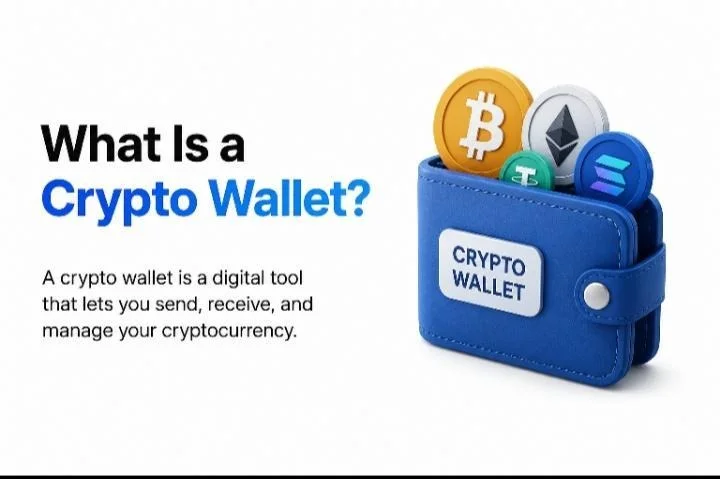
A crypto wallet is a tool that manages the cryptographic keys proving you own crypto on the blockchain, it doesn’t actually “store” coins.
Your funds stay on the blockchain itself; the wallet holds your private key (which proves ownership) and generates a public key/address (which others use to send you funds), letting you sign transactions to move or receive crypto.
How Wallets Actually Work
Every wallet is built around a pair of cryptographic keys: a public key and a private key. When your wallet is created, it generates the private key first, a long, randomly produced string of characters.
From that private key, the wallet derives a matching public key, and that public key is what gets turned into the address you share with others.
This is a one-way process: your public address can be generated from your private key, but nobody can work backward from the public address to figure out your private key (the private key is derived through a one-way function, which is why it can’t be reverse-engineered from the public key).
Think of it less like a piggy bank and more like an email account: your public key is the address you hand out so people can send you something, while your private key is the password that proves the account belongs to you
Wallet vs. Exchange Account: Key Differences
People often use “wallet” and “exchange account” interchangeably, but they’re built for different jobs, and the difference comes down to one word: custody.
A wallet is a key-management tool. Its job is to hold your keys (or, in the case of a non-custodial wallet, let you hold them) and let you sign transactions directly on the blockchain.
An exchange is a trading platform, a marketplace for buying, selling, and swapping crypto, built around an internal account system rather than direct blockchain access where customers deposit assets into a custodial wallet managed by the exchange and submit trading instructions through an internal order book.
How to Choose the Right Wallet Type
Beginners often start with a custodial exchange account or a passkey-secured smart wallet, minimal setup, no seed phrase to lose.
Daily traders typically want a hot wallet (mobile or browser extension) for fast access to DeFi and exchanges.
Long-term holders are usually better served by a hardware wallet or MPC setup, prioritizing security over convenience since they’re not transacting often.
Factors to Consider When Creating a Crypto Wallet
A few key factors make choosing a wallet much easier:
Security: This should be the top priority. Look for features like two-factor authentication, multi-signature support, and reliable backup and recovery options, and stick with wallets that have a proven security track record.
Fees: Costs vary widely between wallets, so check for transparent pricing upfront. Some wallets charge extra for specific features or transaction types, so it’s worth reading the fine print.
Supported cryptocurrencies: If you plan to hold multiple assets, confirm the wallet supports all of them before committing and check the provider’s website for the full list rather than assuming.
Customer support: Responsive support and solid documentation (guides, FAQs) matter more than people expect, especially if you run into an issue with funds on the line.
Not all wallets are created equal, and picking the wrong one isn’t just inconvenient, it can cost you control, convenience, or in some cases, your funds entirely. Here’s every option on the table right now.
Custodial Wallets
A third party (usually an exchange) holds your keys for you, easy to start with, but you’re trusting their security and solvency rather than controlling funds yourself.
Non-Custodial (Self-Custody) Wallets
You hold your own private key, backed by a seed phrase. Full control, full responsibility, lose the phrase with no backup, and there’s no support line to help.
Hot Wallets
Stay connected to the internet, making them convenient but more exposed. This includes mobile wallets (Trust Wallet, Coinbase Wallet: good for daily use), desktop wallets (more advanced settings, tied to that machine’s security).
Cold Wallets
Keep keys fully offline. Hardware wallets (Ledger, Trezor, Tangem) sign transactions on-device and are the standard for long-term storage. Paper wallets, a printed key and address are largely outdated now due to physical fragility and exposure risk during use.
MPC (Multi-Party Computation) Wallets
Splits the private key across multiple parties so no single party ever holds it whole, signing happens via threshold cryptography without ever reconstructing the full key. This means one leaked fragment or offline node isn’t fatal, unlike a single lost seed phrase.
Multisig Wallets
Requires two or more separate, complete keys to approve a transaction, common for DAOs and treasuries where auditable, transparent approval matters more than speed.
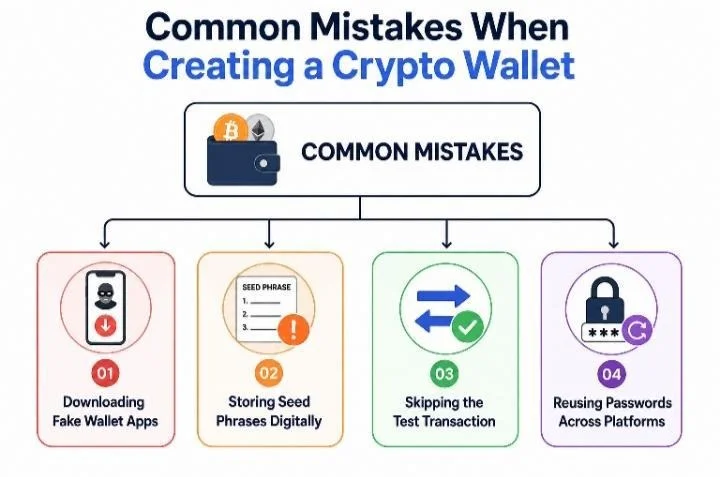
Even careful holders slip up here, a few small missteps during setup cause most of the losses that follow. Here are the ones worth watching for.
Downloading Fake Wallet Apps
Scammers clone official wallet apps and listings, sometimes ranking above the real one in search results or app stores. Always go through the provider’s official website first and verify the developer name before installing anything.
Storing Seed Phrases Digitally
Screenshots, cloud notes, photos, and password managers connected to the internet are all vulnerable to hacks and malware. A seed phrase should exist only on paper or metal, offline, where no remote attacker can ever reach it.
Skipping the Test Transaction
Sending a full balance on the first try, without confirming the address, network, and amount are correct with a small test sent first is one of the easiest ways to lose funds to a simple mistake rather than a hack.
Reusing Passwords Across Platforms
Using the same password for your wallet, email, and exchange accounts means one breach anywhere can cascade into all of them. Each account tied to your crypto should have its own unique, strong password.
Case Study: A Properly Set Up Wallet, Still Drained
In July 2026, a crypto holder lost $999,999 (nearly $1 million) in USDT after signing a phishing token approval on Ethereum.
The victim was tricked into signing a malicious token approval, which gave attackers permission to move funds without needing another signature, an automated “sweeper” then drained the wallet using that approval.
This wasn’t a case of a leaked seed phrase or a fake wallet app. The wallet itself was legitimate; the owner simply approved a transaction they shouldn’t have.
How to Create a Crypto Wallet Step by Step
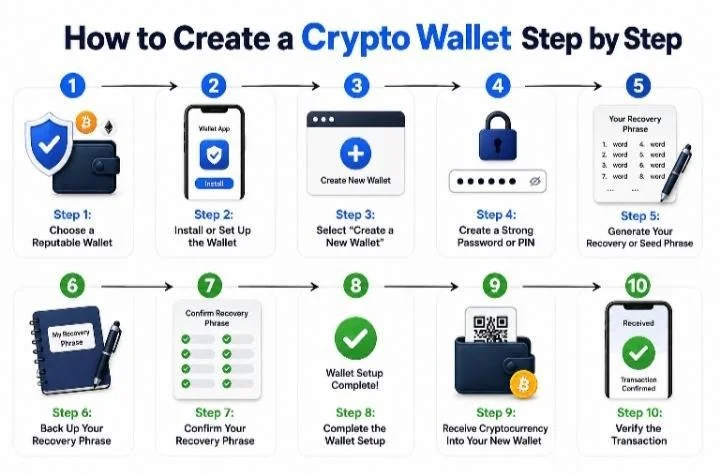
Somewhere between “click create” and actually owning your crypto, there are a few steps most guides gloss over. Here’s the full walkthrough, from choosing a wallet to confirming your first transaction.
Step 1: Choose a Reputable Wallet
Go directly to the wallet provider’s official website first, then follow their link to the app store, never search “download [wallet name]” and click the first result, since fake wallet apps and cloned sites are one of the most common ways people lose funds before sending a single transaction.
Confirm the listed developer matches the official company name, check review dates for signs of manipulation, and cross-check the download link against the URL posted on the project’s official social account. Also confirm the wallet supports the blockchains you actually need, some wallets are single-chain, others multi-chain before committing.
Step 2: Install or Set Up the Wallet
For mobile, download only from the official App Store or Google Play listing and grant just the permissions the app genuinely needs. For desktop, download the installer over HTTPS from the official site and, where available, verify the file’s checksum against the one published there.
For browser extensions, install only through the browser’s official extension store and watch for near-identical clones using similar names and logos
Step 3: Select “Create a New Wallet”
Most wallets show two options at launch: “Create a new wallet,” which generates a brand-new key pair and seed phrase, and “Import/restore a wallet,” which recovers an existing one from a seed phrase you already have.
First-time setup means choosing “Create new.” Importing with the wrong phrase isn’t dangerous, it just won’t restore anything but never import a seed phrase someone else gave you, since that means they may hold a copy too.
Step 4: Create a Strong Password or PIN
Use a long, unique passphrase (12+ characters, mixed case, numbers, symbols) that you don’t reuse elsewhere, hardware wallets typically use a numeric PIN entered on-device, which locks or wipes after repeated failed attempts.
Importantly, this password only unlocks the app on that device, it is not the same as your recovery phrase and cannot restore your wallet elsewhere. Treat the two as completely separate layers of security.
Step 5: Generate Your Recovery or Seed Phrase
A seed phrase is a sequence of common words, generated by your wallet under the BIP-39 standard, that encodes your private key; anyone who has it can fully control your wallet.
Wallets use word phrases instead of raw private keys because they’re far easier for people to transcribe and back up accurately. Both 12-word and 24-word phrases are considered secure; a 24-word phrase adds extra margin and is common on hardware wallets.
Step 6: Back Up Your Recovery Phrase
Write the phrase down with pen and paper (or a metal backup) in the exact order shown, never as a screenshot, photo, cloud note, or anything internet-connected, since word order is part of what generates your keys. For durable, long-term storage, steel is a strong option, it needs no software, is nearly indestructible, and the backup process stays fully offline.
Step 7: Confirm Your Recovery Phrase
Most wallets have you re-enter or select the words in order immediately after showing them, confirming your backup is accurate before any funds are at risk. If you enter it wrong, the wallet simply flags the mismatch and lets you try again, nothing is lost, but take this check seriously since it’s your only real-time verification.
Step 8: Complete the Wallet Setup
Turn on biometric lock, auto-lock timers, and for custodial or exchange accounts, two-factor authentication via an authenticator app rather than SMS, which resists SIM-swap attacks better. Review default network settings and any dApp auto-connect permissions, disabling anything unfamiliar. Finally, open the “Receive” screen once to confirm an address is generated and displayed correctly.
Step 9: Receive Cryptocurrency Into Your New Wallet
Your address is usually shown under “Receive” as a long alphanumeric string and/or QR code. If your wallet supports multiple networks, double-check that both you and the sender are using the same one, sending on the wrong network is one of the most common ways funds get lost or delayed.
Copy the address rather than retyping it, and verify the first and last few characters after pasting, since some malware silently swaps addresses on the clipboard.
Step 10: Verify the Transaction
After sending, your wallet shows a transaction hash, a unique ID for that transfer. Paste it into a public blockchain explorer (like Etherscan for Ethereum, or the equivalent for your chain) to independently confirm the amount, status, and destination address.
Transactions need a handful of network confirmations before they’re final, anywhere from seconds to several minutes depending on the chain and congestion after which your transfer is complete.
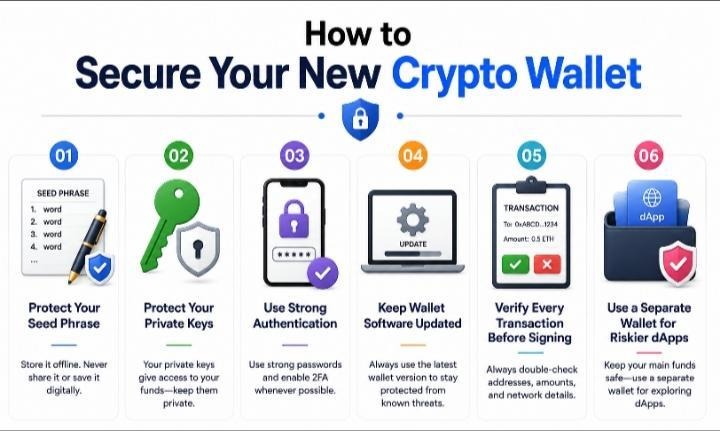
How to Secure Your New Crypto Wallet
Setting up your wallet correctly is only half the job, most funds are lost after creation, not during it. Here’s how to keep it that way.
Protect Your Seed Phrase
Never share it, type it into a website, or send it via email/messaging, legitimate services never ask for it. Avoid cloud storage, screenshots, and photos entirely. Anyone who gets it can control your funds; if you lose it, recovery may be impossible.
Protect Your Private Keys
Keep your private key as secret as your seed phrase, it’s what authorizes transactions. The two are related (your seed phrase can regenerate your keys), but exposing either one gives someone full control of your wallet.
Use Strong Authentication
Set a unique, non-reused password, enable two-factor authentication via an authenticator app (not SMS) where supported, and turn on device biometrics for quick, secure access.
Keep Wallet Software Updated
Install updates only through the official app, extension store, or manufacturer site, never third-party links and avoid modified or “cracked” wallet apps, a common source of stolen funds.
Verify Every Transaction Before Signing
Double-check the recipient address, confirm you’re on the correct network, verify the amount, and review any smart contract approval carefully, unlimited approvals are a common way wallets get drained later.
Use a Separate Wallet for Riskier dApps
Keep a main wallet for real funds and a low-balance “burner” wallet for testing new or unfamiliar dApps, limiting your exposure if one turns out to be malicious.
There's no Call To Action with the ID #0.
Conclusion
Setting up a crypto wallet isn’t the hard part, you’ve seen that by now. The real work is in the habits that surround it: downloading from the right source, backing up your seed phrase somewhere no photo or cloud service will ever touch, and slowing down enough to actually read what you’re signing before you approve it.
Every case of a “properly created” wallet losing funds traces back to one of those habits slipping, not to the wallet itself failing.
If you’re just getting started, don’t feel pressure to get everything perfect on day one. Start with a small amount, send a test transaction, get comfortable with how your wallet behaves, and build from there.
You now know how a wallet actually works, so you’re already ahead of most people setting one up.
Frequently Asked Questions
Is it free to create a crypto wallet?
Yes, creating a non-custodial software wallet (mobile, desktop, or browser extension) costs nothing, you’re only generating cryptographic keys. Hardware wallets are the exception, since you’re paying for the physical device itself, typically $50–$250 depending on the model.
Can I have multiple wallets?
Yes, and many people do for example, a hardware wallet for long-term holdings and a separate “burner” hot wallet for testing new dApps. Each wallet has its own independent seed phrase, so they don’t share security or funds unless you move assets between them yourself.
What happens if I lose my seed phrase?
If you still have access to the wallet app or device and haven’t lost that too, you can view or replace your backup while you still can. But if both the device and the seed phrase are gone, the funds are typically unrecoverable, there’s no company or support line that can restore a non-custodial wallet without it.
Are seedless (passkey) wallets safe?
They can be, but they shift risk rather than eliminate it, recovery depends on your device and cloud account (like iCloud or Google) instead of a phrase you control directly. They’re generally considered fine for smaller, everyday balances, while larger holdings still lean toward traditional seed-phrase or hardware wallets.
Do I need a wallet to buy crypto?
Not necessarily at first, most exchanges let you buy and hold crypto in a custodial account without setting up a separate wallet. But if you want full control of your funds, want to use DeFi apps, or plan to hold long-term, moving funds into your own non-custodial wallet is the standard next step.
What’s the difference between a hot wallet and a cold wallet?
A hot wallet stays connected to the internet (mobile, desktop, browser extension), making it convenient for frequent transactions but more exposed to online threats.
A cold wallet, typically a hardware device, keeps your private key offline entirely, trading some convenience for significantly stronger security, which is why it’s usually recommended for larger, long-term holdings.
Hello, welcome to my Profile. I am a passionate content writer, copywriter and fiction writer. I have a zeal to always deliver engaging and high quality content. I’ve perfected the art of blending imaginative thoughts with relatable themes crafting stories that captivates and connects with various audiences.
Disclaimer: This article is intended solely for informational purposes and should not be considered trading or investment advice. Nothing herein should be construed as financial, legal, or tax advice. Trading or investing in cryptocurrencies carries a considerable risk of financial loss. Always conduct due diligence before making any trading or investment decisions.
Trade with proof of Reserves
UEEx publish monthly audits and third party verification on every listed market.