WordPress database error: [You have an error in your SQL syntax; check the manual that corresponds to your MariaDB server version for the right syntax to use near '' at line 1] SELECT * FROM wp_mica_ecta WHERE cta_id =
WordPress database error: [You have an error in your SQL syntax; check the manual that corresponds to your MariaDB server version for the right syntax to use near '' at line 1] SELECT * FROM wp_mica_ecta WHERE cta_id =
WordPress database error: [You have an error in your SQL syntax; check the manual that corresponds to your MariaDB server version for the right syntax to use near '' at line 1] SELECT * FROM wp_mica_ecta WHERE cta_id =
WordPress database error: [You have an error in your SQL syntax; check the manual that corresponds to your MariaDB server version for the right syntax to use near '' at line 1] SELECT * FROM wp_mica_ecta WHERE cta_id =
You send crypto to your wallet, and you refresh the app, but your balance still shows zero. Your stomach drops. Did you just lose your money?
Take a breath. In the vast majority of cases, crypto not showing in your wallet does not mean it’s gone. It usually means your wallet is looking in the wrong place or hasn’t caught up yet.
This guide walks through every common reason your crypto might be missing, how to check what’s actually going on, and what to do about it, plus what to do if you sent funds to the wrong network entirely.
There's no Call To Action with the ID #0.
Key Takeaways
The blockchain is the real deal, and your wallet is just a window. If a block explorer shows your crypto at your address, it exists, even if your wallet app says otherwise.
Check your network first. A huge share of “missing crypto” cases are simply the wallet pointing at the wrong blockchain. This takes ten seconds to check.
Test small before you send big. A $10 test transaction before a $10,000 transfer costs you a few minutes and can save you from a very bad day.
Learn to read a block explorer. Etherscan, BscScan, and similar tools tell you more than any support ticket will.
Know when to stop. Most fixable issues resolve within 30 minutes. If you’ve spent hours chasing a small balance, it may be time to treat it as a lesson and move on.
Why Is My Crypto Not Showing in My Wallet? The Short Answer
Your crypto isn’t actually stored “in” your wallet app. Your crypto wallet is a viewer, a bit like an app that shows your bank balance without physically holding your cash. The real record of what you own lives on the blockchain itself.
So when your wallet shows zero, the problem is almost always with the viewer, not with your funds. Wrong network selected, an unsynced app, a token that needs to be added manually, or a transaction that’s still confirming: these are the usual suspects, and every one of them is fixable.
Your wallet doesn’t hold your crypto. It shows you what the blockchain already knows. When the display is wrong, the fix is almost never a lost-funds problem; it’s a settings problem.
Keep that idea in mind as you work through this guide. It will keep you calm, and it will point you toward the right fix faster.
If Your Crypto Is Missing Right Now, Do This First
Before you dig into every possible cause, run through this quick checklist:
Stop; don’t send anything else until you understand what happened.
Breathe. Most cases are recoverable or simply a display issue.
Save your transaction hash. You’ll need this for every step that follows.
Look it up on a block explorer. Etherscan for Ethereum, BscScan for BNB Smart Chain, Solscan for Solana, and so on.
Check your wallet’s network setting. Confirm it matches the network the transaction actually used.
Try importing the token manually. New or less common tokens often don’t show up automatically.
Force a refresh or restart the app.
If none of that clears it up, keep reading. The next section breaks down exactly why this happens.
The 12 Most Common Reasons Your Crypto Isn’t Showing in Your Wallet
Explore are the 12 most commons reasons why your crypto isn’t showing in your wallet
1. You Sent Crypto on the Wrong Network
Sending crypto on the wrong network is a common and potentially serious issue. For example, you may send USDT through BNB Smart Chain instead of Ethereum. Check the transaction on the appropriate blockchain explorer.
If funds reached an address you control, switching to the correct network may make them visible. Recovery is often easier across EVM-compatible networks, while incompatible networks can make recovery difficult or impossible.
Risk: High First step: Confirm the network used and check the destination address on its explorer.
2. The Token Has Not Been Added to Your Wallet
Your wallet may not automatically display every token, especially new DeFi and smaller assets. If a blockchain explorer confirms the token is in your address, manually add the supported token using its correct contract address.
MetaMask supports automatic detection across several networks, including Ethereum, BNB Smart Chain, Polygon, Arbitrum, Optimism, Base, and Solana.
Risk: Low Typical fix: A few minutes.
3. The Transaction Is Still Pending
A transaction may remain pending before confirmation. On Ethereum, validators include transactions in blocks before finality. Bitcoin also requires confirmations after block inclusion, with more confirmations recommended for larger transfers.
Always verify the transaction hash on the relevant blockchain explorer rather than relying solely on wallet status.
Risk: Medium Fix: Usually wait for confirmation unless the transaction is genuinely stuck.
4. Your Wallet Has Not Refreshed Properly
Sometimes your wallet may fail to display an updated balance even when the blockchain is working correctly.
Connectivity issues, RPC errors, cached data, or service outages can cause this. Refresh or restart your wallet, reconnect to the network, and verify your balance on a blockchain explorer.
Risk: Low Fix: Usually takes seconds or a few minutes.
5. You Are Viewing the Wrong Network
Your funds may have arrived exactly where they should, but your wallet is displaying another blockchain. For example, if you received USDC on Base while your wallet is showing Ethereum Mainnet, the asset may appear to be missing. Simply switch to Base and check again.
Modern wallets support multiple networks, so always compare the network selected in the wallet with the network shown in your transaction details.
Risk: Low Fix: Usually immediate.
6. You Sent the Funds to the Wrong Address
Confirmed blockchain transactions are generally irreversible if sent to an address you don’t control. Recovery usually depends on the recipient voluntarily returning the funds.
If you know the recipient, contact them directly; for exchange-controlled addresses, use the exchange’s official support channel. Stay alert for address-poisoning scams involving lookalike wallet addresses.
Risk: Critical Fix: Usually impossible without cooperation from the recipient.
7. Your Wallet App or Extension Is Outdated
An outdated wallet application, browser extension, or corrupted local data can cause balances or transactions to display incorrectly. Update the wallet to its latest official version and restart it. If necessary, reinstall it, but never uninstall a wallet until you have safely backed up the recovery phrase and verified that you can restore the account.
Risk: Low Fix: Usually 5–15 minutes.
8. Your Exchange Has Not Processed the Withdrawal
If you withdrew crypto from an exchange, the exchange may still be processing the transaction before broadcasting it to the blockchain. For example, Coinbase distinguishes between pending withdrawals and completed withdrawals; a completed withdrawal provides the transaction hash.
If there is no transaction hash yet, check the exchange withdrawal status first. Once a hash exists, use it to investigate the transaction on-chain.
Risk: Low to medium Fix: Depends on the exchange’s processing and security procedures.
9. You Used a Layer-2 Network Your Wallet Has Not Enabled
Layer 2 networks such as Arbitrum, Optimism, and Base operate separately from the Ethereum mainnet. If you send funds through one of these networks, your wallet must support and display that network.
If the transaction is confirmed on the Layer-2 explorer but the wallet does not show the asset, enable the correct network or add it using the wallet’s supported network settings.
MetaMask, for example, allows users to add supported networks and custom networks. Always verify network information before adding a custom network because wallets may not independently verify every custom network configuration.
Risk: Medium Fix: Usually straightforward if the funds remain in an address you control.
10. You Mistook a Smart-Contract Transaction for a Transfer
Not every blockchain transaction sends crypto into your wallet. You may have approved a token, staked assets, interacted with a DeFi protocol, minted an NFT, or completed a swap. Ethereum distinguishes ordinary transfers from smart contract interactions, which execute functions in contracts.
Check the transaction details on the explorer. Look for token transfers and contract calls rather than assuming every successful transaction should increase your wallet balance.
Risk: Low Fix: Usually no technical fix is required.
11. Your Hardware Wallet Is Showing the Wrong Account
Hardware wallets such as Ledger and Trezor can manage multiple accounts and, in some cases, passphrase-protected wallets. Opening the wrong account can therefore make a funded wallet appear empty.
Trezor explains that each unique passphrase combined with the wallet backup generates a different wallet and set of addresses. Even a small change in the passphrase can produce a different wallet.
Check the correct account, address, and passphrase before assuming your funds are missing.
Risk: Low to high, depending on the cause Fix: Usually configuration-related.
12. The Network Is Congested
Heavy network activity can delay transactions when demand exceeds block space. Check the transaction on a blockchain explorer and review network activity before acting.
Avoid resending it, as this could create a duplicate transfer. On Ethereum, transactions wait in the pending pool until validators include them in a block, while finality provides stronger confirmation that the transaction is unlikely to be reversed.
Risk: Medium Fix: Usually waiting, although some pending transactions may require specific wallet or network actions
How to Find Your Missing Crypto: Step by Step
Here’s a practical order to work through these issues.
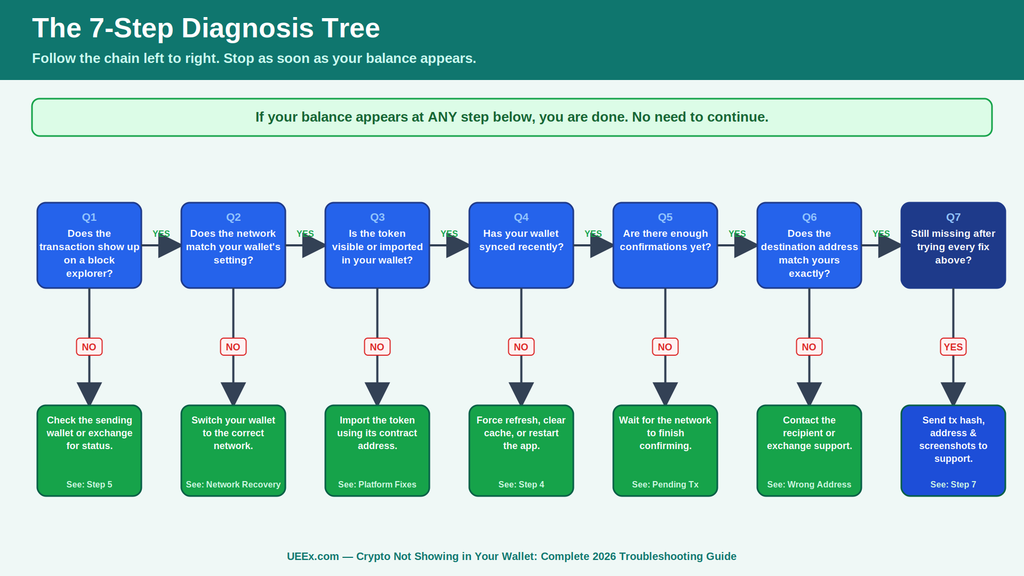
Step 1: Confirm the transaction actually happened
Go to the right block explorer for the network in question and search your wallet address. If you see the incoming transaction, move to Step 2. If you don’t see it at all, the transaction may never have been sent, or it’s stuck on the sending side. Skip ahead to Step 5.
Step 2: Check that the network matches
Look at the network shown on the block explorer, then check which network your wallet app is currently displaying. This single mismatch causes an enormous share of “missing crypto” reports. If they don’t match, switch your wallet to the correct network and see if your balance appears.
Step 3: Import the token manually if needed
In MetaMask: scroll to the bottom of your token list, choose “Import tokens,” paste in the contract address, and confirm.
In Trust Wallet: tap the toggle icon in the top right, search for the token, and switch it on. If it’s not listed, use “Add Custom Token” and paste the contract address.
In Coinbase Wallet: check Settings, then Networks, to make sure the right chain is enabled. Give it a few minutes to sync afterward.
Step 4: Force a sync
Clear the app’s cache, sign out and back in, or simply close and reopen it. On mobile, toggling airplane mode on and off can reset a stuck connection.
Step 5: Check the sending side
Log into the exchange or wallet you sent from and look at the transaction status. “Completed” should come with a transaction hash you can verify on an explorer. “Failed” means the funds never left, while “Processing” means you just need to wait a bit longer.
Step 6: Dig deeper if you’re still stuck
Check the number of confirmations on the explorer, verify your hardware wallet’s derivation path, confirm your wallet actually supports that network or token, and check whether a custom RPC connection might be down.
Step 7: Contact support with everything ready
If nothing above works, reach out to your wallet or exchange’s official support with your transaction hash, wallet address, device and app version, and a screenshot from the block explorer. This saves everyone time and speeds up a resolution.
Legitimate support teams will never ask for your seed phrase or private key. If someone messaging you offers to “validate” or “sync” your wallet in exchange for that information, it’s a scam.
There's no Call To Action with the ID #0.
Platform-Specific Troubleshooting Guides
Here are some examples of how to fix the issue on specific wallets
MetaMask
MetaMask users often find that missing tokens simply haven’t been imported. Import the token from Etherscan’s token list using its contract address through “Import tokens.” Note that a $0 price despite a correct balance usually indicates a delayed price feed, which may resolve within 15 minutes.
Connection errors can also result from an unavailable RPC (the server MetaMask uses to talk to the blockchain). Switching to an alternative RPC under Settings, then Networks, may restore connectivity. For detailed troubleshooting, consult MetaMask’s official support documentation.
Trust Wallet
Trust Wallet hides tokens by default until you switch them on, which trips up a lot of new users. Tap the toggle icon, search for your asset, and enable it.
If you’ve used Trust Wallet’s built-in browser to connect to a decentralized app, it’s worth checking your token approvals. A malicious contract can quietly gain permission to move your funds later. Trust Wallet’s support documentation covers this and other common fixes in detail.
Coinbase Wallet
Here’s an important distinction: Coinbase, the exchange, and Coinbase Wallet, the self-custody app, are two separate things with two separate addresses. Sending between them requires an actual withdrawal or deposit, not just switching screens inside one app.
If a transaction isn’t showing after a withdrawal, try signing out and back in, or check Coinbase’s status page for any ongoing service issues. Smart contract interactions (like a swap on a decentralized exchange) also sometimes don’t display cleanly in the activity feed, even though the underlying balance is correct.
Ledger and Trezor (Hardware Wallets)
Hardware wallets add a layer most software wallets don’t have to deal with: derivation paths. Think of a derivation path as a specific “address book” your device uses to generate wallet addresses.
If you connect your hardware wallet to MetaMask or another interface using the wrong path, you’ll see a different set of addresses and a different (often empty-looking) balance.
If your balance looks wrong, double-check the derivation path setting, confirm your firmware is up-to-date, and make sure you haven’t accidentally entered a passphrase, since a passphrase creates an entirely separate hidden wallet from your standard one. Both Ledger and Trezor publish detailed troubleshooting guides for exactly this scenario.
How to Recover Crypto Sent to the Wrong Blockchain
Sending crypto on the wrong blockchain can be alarming, but the outcome depends mainly on the networks involved and who controls the destination address.
Understand Network Compatibility
Blockchains operate independently and use different address systems and token standards.
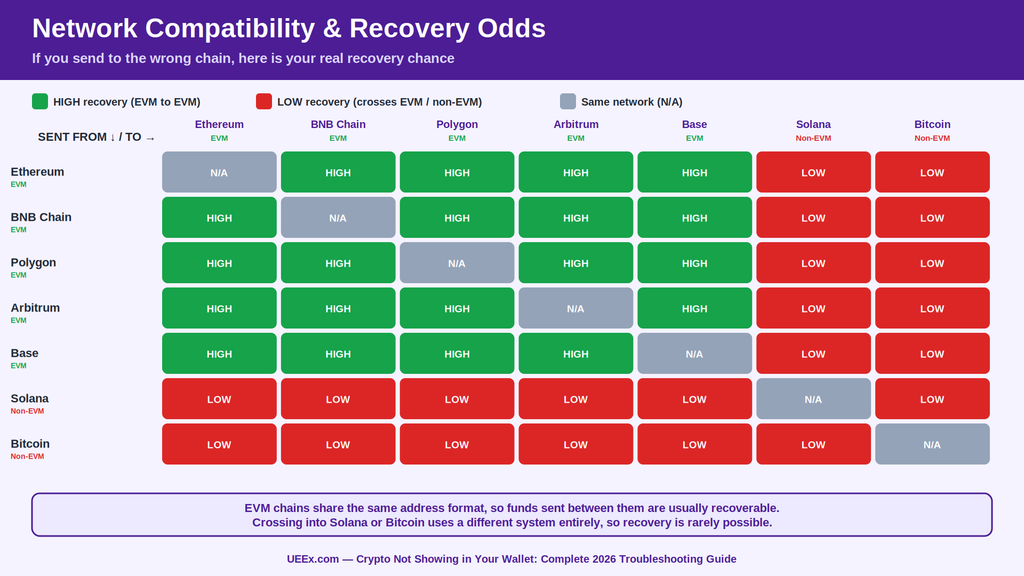
EVM networks: Ethereum, BNB Smart Chain, Polygon, Avalanche, Arbitrum, Optimism, and Base use compatible 0x-style addresses. A self-custody wallet can generally access the same address across these networks.
Non-EVM networks: Solana, Cardano, and Bitcoin use different address structures and account systems. Sending assets between incompatible networks can make recovery extremely difficult or impossible.
Token standards differ: Ethereum uses ERC-20, BNB Smart Chain uses BEP-20, and Solana uses SPL tokens. The same asset name does not mean the asset exists on the same network.
For example, USDT on Ethereum and USDT on another network are separate on-chain assets. Always verify asset, network, and destination address before confirming a transfer.
Common Wrong-Network Scenarios
1. EVM to EVM: Usually Recoverable
If you send USDC or another token from Ethereum to your own wallet while the wallet is displaying BNB Smart Chain, the funds may not be lost. The transaction exists on Ethereum; your wallet is simply displaying another network.
What to do:
Open your self-custody wallet.
Switch to the network used for the transaction.
Check the transaction on the relevant block explorer.
Add the token manually if it is not displayed.
Once accessible, use a reputable bridge or supported swap route to move it to the desired network.
MetaMask confirms that tokens sent to the wrong EVM network can often be accessed by switching to that network.
2. Exchange Deposit on the Wrong Network
This is more complicated because the exchange controls the destination address.
For example, sending an asset over BNB Smart Chain to an exchange deposit address intended for Ethereum does not guarantee recovery. The exchange must support the asset and network and have a recovery process.
Do this immediately:
Save the transaction hash, asset, amount, and destination address.
Check the transaction on the relevant explorer.
Contact the exchange through its official support channel.
Ask specifically about unsupported-network or asset recovery.
Never send additional funds to “unlock” the transaction.
Recovery policies vary. UEEx, for example, provides a paid recovery assistance service for misdirected user deposits involving the wrong currency or chain name.
3. EVM to Non-EVM: High Risk
Sending an Ethereum-based asset to a Solana or other non-EVM address is substantially more difficult. The address systems and key structures differ, so the destination may not correspond to an accessible account on the sending chain.
If an exchange initiated the transaction, contact it immediately. If you sent directly from one self-custody wallet to an incompatible network, recovery may not be possible.
Use Bridges Carefully
A cross-chain bridge can move supported assets between compatible networks, but a bridge cannot reverse an already completed transaction or recover funds sent to an inaccessible address. However, if you need to move assets between compatible networks, use an official bridge, not a random link from social media.
Bridges have historically been one of crypto’s biggest targets for hackers. Chainalysis tracked more than $2 billion in losses from cross-chain bridge hacks between 2021 and 2023 alone, including the $625 million Ronin Bridge exploit and the $190 million Nomad Bridge hack.
For legitimate transfers, use the destination network’s official bridge or a well-established bridging protocol. For example, Arbitrum’s official bridge provides Ethereum-to-Arbitrum connectivity, while Base is built around interoperability with Ethereum and other ecosystems.
Bridge safety checklist:
Verify the URL from the network’s official website.
Confirm the supported asset and source/destination chains.
Never enter a seed phrase or private key.
Ignore unsolicited “recovery” or “bridge” offers in DMs.
Test with a small amount before moving substantial funds.
Bridges move value between blockchains that can’t otherwise talk to each other. That convenience is exactly why they’ve also been the single largest target for crypto hackers in history.
When to Stop and When to Keep Trying
Keep investigating when:
You control the destination wallet.
The transfer involved two EVM networks.
An exchange supports both the asset and network.
The transaction is confirmed, and the destination address is identifiable.
Recovery may be impossible when:
The destination address is incorrect, and nobody controls it.
The asset was sent to an incompatible network or unsupported contract.
An exchange confirms that its recovery process cannot retrieve the funds.
Most importantly, never share your seed phrase or private key with a recovery service or support agent. Legitimate wallet providers will not need them.
Understanding Blockchain Explorers: Your Investigation Tool
Blockchain explorers, such as Etherscan, BscScan, and PolygonScan, are the FedEx tracking systems of crypto. They turn public on-chain data into readable transaction records, allowing you to verify where funds came from, where they went, when they moved, and whether a transaction succeeded.
What Blockchain Explorers Show
Depending on the network, an explorer can display:
Transaction hash: A unique ID for tracking a transaction.
Status: Pending, successful, or failed.
From/To: The sending and receiving addresses.
Amount: Native coins or transferred tokens.
Timestamp: When the transaction was processed.
Block and confirmations: Where the transaction was recorded.
Fees and gas: What the transaction cost.
Token transfers: Specific ERC-20 or other supported assets moved.
Use Explorers to Troubleshoot
Transaction successful but wallet balance is missing?
Refresh or resync the wallet.
Confirm you are using the correct network.
Add/import the token contract if necessary.
Transaction remains pending?
Check the gas price and network conditions.
A transaction can remain pending when its fee is below the network’s current base fee.
If supported by your wallet, speed up or replace the transaction.
Transaction cannot be found?
Confirm the hash is correct.
Make sure you are searching the correct blockchain explorer.
If an exchange withdrawal has no transaction hash, the exchange may not have broadcast it yet.
Transaction failed?
Check the explorer’s error details.
Common causes include insufficient gas or a smart-contract execution failure.
A failed transaction generally does not transfer the intended assets, although the gas used may still be charged.
Funds went to the wrong address?
Blockchain transactions are generally irreversible.
If the address belongs to an exchange or identifiable service, contact its support team immediately.
Transaction Status: Pending, Failed, or Stuck
Understanding Transaction States
A pending transaction has been submitted and is waiting for a validator or miner to include it in a block. Confirmed means the transaction has been included in a block, although some networks require additional confirmations or finality before it is considered irreversible. On Ethereum, transactions move from the transaction pool into a block and then toward justified and finalized status.
A failed transaction was included but reverted or rejected during execution. The transaction fee may still be charged, while the transferred funds generally remain with the sender. A stuck transaction is one that remains pending unusually long, often because of low fees, nonce conflicts, congestion, or network problems.
How Long Should a Transaction Take?
Confirmation times vary by network and network conditions, so fixed estimates can quickly become outdated. Ethereum operates with 12-second slots, while Bitcoin produces a block roughly every 10 minutes on average.
As a practical guide:
Solana and other high-speed chains: usually seconds when operating normally.
Ethereum and EVM networks: typically seconds to minutes, depending on fees, congestion, and the network.
Bitcoin: the first confirmation can take around 10 minutes on average, but low-fee transactions can take much longer.
Rather than relying on a universal cutoff, check the transaction hash on the relevant block explorer and verify whether the network is processing new blocks normally.
Why Transactions Get Stuck
Low network fee: Validators prioritize transactions offering competitive fees. A transaction with an unusually low fee can remain in the mempool.
Nonce conflicts: On account-based networks such as Ethereum, transactions use sequential nonces. An earlier pending transaction can prevent later transactions from being processed.
Network congestion: Heavy activity can fill the transaction pool and increase fees, extending confirmation times.
Network issues: If validators stop producing blocks or the network experiences an outage, transactions may remain pending until normal operations resume.
There's no Call To Action with the ID #0.
How to Speed Up or Cancel a Transaction
On supported networks, MetaMask now lets users speed up or cancel pending transactions directly from its transaction details. Speeding up resubmits the transaction with a higher fee, while cancellation replaces the pending transaction using the same nonce. These actions only work while the original transaction remains pending; confirmed transactions cannot be reversed.
If your wallet does not provide these controls, avoid repeatedly submitting new transactions without checking the nonce first. For complex cases, inspect the transaction on the appropriate block explorer before taking further action.
Out of gas: The transaction runs out of gas during execution, consuming the fee but reverting the operation.
Insufficient funds: The balance does not cover the transfer plus the required network fee.
Contract revert: A smart contract rejects the transaction because of conditions such as excessive slippage, missing approvals, or a paused contract.
Nonce too low: The wallet attempts to use a nonce that has already been processed or replaced.
Prevention Strategies: Never Lose Crypto Again
This verification routine can prevent costly errors.
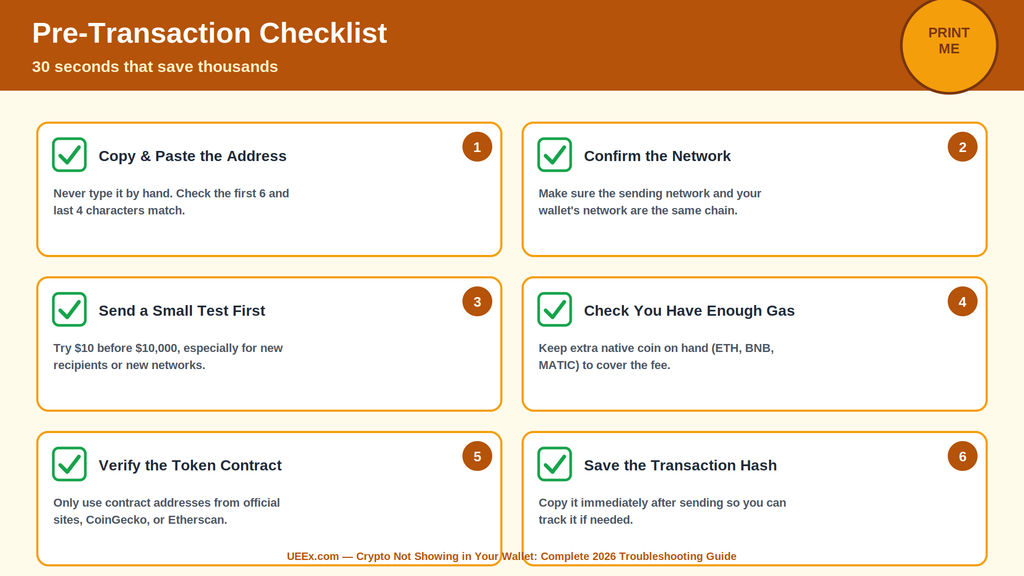
Before Every Transaction: The 30-Second Checklist
Verify the destination address: Copy and paste rather than typing manually, then compare several characters at the beginning and end with the original. Clipboard malware can replace copied addresses, so never trust the pasted address blindly.
Match the network: Confirm that the sender and recipient support the same network. For example, if your wallet is receiving ETH on Ethereum, select Ethereum/ERC-20 rather than BNB Chain or Tron simply because the fee is lower.
Send a small test first: For a new recipient or unfamiliar wallet, send a small amount and confirm it arrives before transferring the full balance.
Check fees and gas: Keep enough native currency to pay transaction fees, ETH on Ethereum, BNB on BNB Chain, and so on. For current Ethereum gas conditions, use Etherscan Gas Tracker.
Verify token contracts: Get contract addresses from the project’s official website or reputable blockchain explorers. Avoid addresses shared through unsolicited DMs, replies, Telegram groups, or advertisements.
Build Safer Wallet Habits
Keep large holdings separate from wallets used for frequent DeFi activity.
Use a hardware wallet for substantial long-term holdings and verify transaction details directly on the device before signing.
Store your recovery phrase offline. Never enter it into a website, form, support chat, or message.
Regularly review and revoke unused token approvals. Revoke.cash explains that approvals can remain active and allow a contract to spend approved tokens even after you stop using a dApp.
Remember that disconnecting a wallet from a dApp does not revoke approvals; permissions must be revoked separately.
Secure Your Exchange Withdrawals
Before withdrawing from an exchange:
Enable 2FA, preferably with an authenticator app or hardware security key rather than SMS.
Use an address allowlist/whitelist where available. Binance, for example, can block withdrawals to addresses that are not whitelisted and applies a security delay when adding new ones.
Save trusted addresses and verify the asset and network before every withdrawal.
Enable withdrawal and security notifications.
For a new destination, start with a small test transfer.
Exchange security features vary. Coinbase supports address-book allowlisting with activation holds, while Kraken’s global settings lock can prevent account changes for a defined waiting period.
Scammers impersonate wallet or exchange employees and ask for your seed phrase, passwords, codes, or remote access.
Rule: Never share your recovery phrase. Contact support only through the platform’s official website or app. Coinbase explicitly warns that its staff will not request passwords, 2FA codes, or remote-access software.
Malicious Approvals
A fake DeFi site can trick you into approving a contract with permission to spend your tokens. Review what you’re signing and revoke unnecessary approvals afterward.
Dust and Unknown Tokens
Unexpected tokens or NFTs can be used to lure users into interacting with malicious contracts. Don’t click, swap, sell, or approve unfamiliar assets simply because they appeared in your wallet.
Clipboard Hijacking
Malware can replace a copied wallet address with an attacker’s address. Always compare the pasted address with the intended destination before signing.
Treat every address, network, token contract, approval request, and support message as something that must be independently verified. In crypto, prevention is far cheaper than recovery, and many blockchain transactions cannot be reversed once confirmed.
There's no Call To Action with the ID #0.
Final Thoughts
Missing crypto feels like an emergency, but it rarely is one. Once you understand that your wallet is just a display and the blockchain is the actual record, most cases stop feeling like a crisis and start feeling like a checklist: check the network, check for pending confirmations, import the token if needed, and refresh the app.
Every crypto user runs into a wallet that won’t show a balance at some point. The ones who handle it calmly are usually the ones who understand how the blockchain actually works underneath the app.
Bookmark a block explorer, learn to read a transaction, and the next time your crypto isn’t showing in your wallet, you’ll know exactly where to look.
Frequently Asked Questions
How long does it take for crypto to show up in my wallet after sending?
Most transactions appear within a few minutes once the network confirms them. Fast networks like Solana or BNB Smart Chain often take under a minute, while Bitcoin can take 10 to 60 minutes, and busy networks can occasionally take longer during periods of congestion.
Can I recover crypto sent to the wrong address?
Only if the person who controls that address is willing to send it back. Blockchain transactions can’t be reversed by anyone, including the wallet provider or the network itself, so double-checking an address before sending is critical.
Why are my tokens not showing even though the transaction succeeded?
This is almost always a display issue. Most wallets don’t automatically list every token in existence. Search your wallet’s “import token” or “add custom token” option, paste in the correct contract address, and it should appear.
What’s the difference between a pending and a failed transaction?
“Pending” means the network hasn’t confirmed it yet, so you just need to wait. “Failed” means the network rejected it, usually due to a gas or smart contract issue, and your original funds typically return to your wallet, though the gas fee spent on the attempt is not refunded.
Disclaimer: This article is for educational purposes only and isn’t financial advice. Cryptocurrency transactions are irreversible, and recovery isn’t guaranteed in every situation. Always verify addresses and networks before sending, keep your recovery phrase backed up securely offline, and only transact with funds you can afford to lose.
Disclaimer: This article is intended solely for informational purposes and should not be considered trading or investment advice. Nothing herein should be construed as financial, legal, or tax advice. Trading or investing in cryptocurrencies carries a considerable risk of financial loss. Always conduct due diligence before making any trading or investment decisions.
Trade with proof of Reserves
UEEx publish monthly audits and third party verification on every listed market.