WordPress database error: [You have an error in your SQL syntax; check the manual that corresponds to your MariaDB server version for the right syntax to use near '' at line 1] SELECT * FROM wp_mica_ecta WHERE cta_id =
WordPress database error: [You have an error in your SQL syntax; check the manual that corresponds to your MariaDB server version for the right syntax to use near '' at line 1] SELECT * FROM wp_mica_ecta WHERE cta_id =
WordPress database error: [You have an error in your SQL syntax; check the manual that corresponds to your MariaDB server version for the right syntax to use near '' at line 1] SELECT * FROM wp_mica_ecta WHERE cta_id =
You place a trade; it moves in your favor. You get distracted for ten minutes, and when you look back, the gain is gone and you’re sitting on a loss. Every trader has lived through this at least once.
A bracket order stops that from happening, and mastering bracket orders is a key skill for any trader. It’s one instruction that sets your entry, your profit target, and your stop loss all at the same time, so the trade manages itself even when you can’t watch the screen.
Bracket orders are the simplest, most accessible piece of that automation, and you don’t need to write a single line of code to use one.
This guide walks through what bracket orders are, the three main types (OCO, OTOCO, and ATM strategies), how to set them up on major platforms, and the mistakes that trip up even experienced traders.
Key Takeaways
A bracket order combines your entry, take-profit, and stop-loss into one linked instruction, so all three orders go in at once instead of one at a time.
OCO works on positions you already hold. OTOCO opens a brand-new position and attaches the exits automatically. NinjaTrader’s ATM strategies add trailing stops and scale-outs on top of that.
Not every broker cancels the second order automatically if the first one fills. Some platforms will leave a stray order live unless you check for it, so know your broker’s specific behavior before you rely on it.
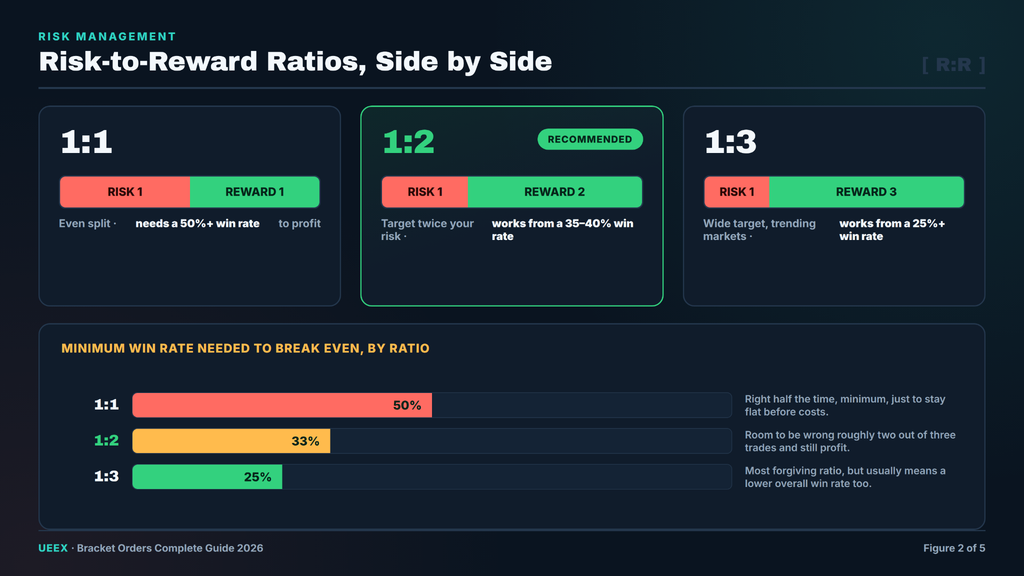
A risk-to-reward ratio of at least 1:2 means you can be profitable even if you’re only right on 35% to 40% of your trades.
Stocks, futures, and crypto each need different bracket settings because their volatility, trading hours, and liquidity aren’t the same.
What Is a Bracket Order?
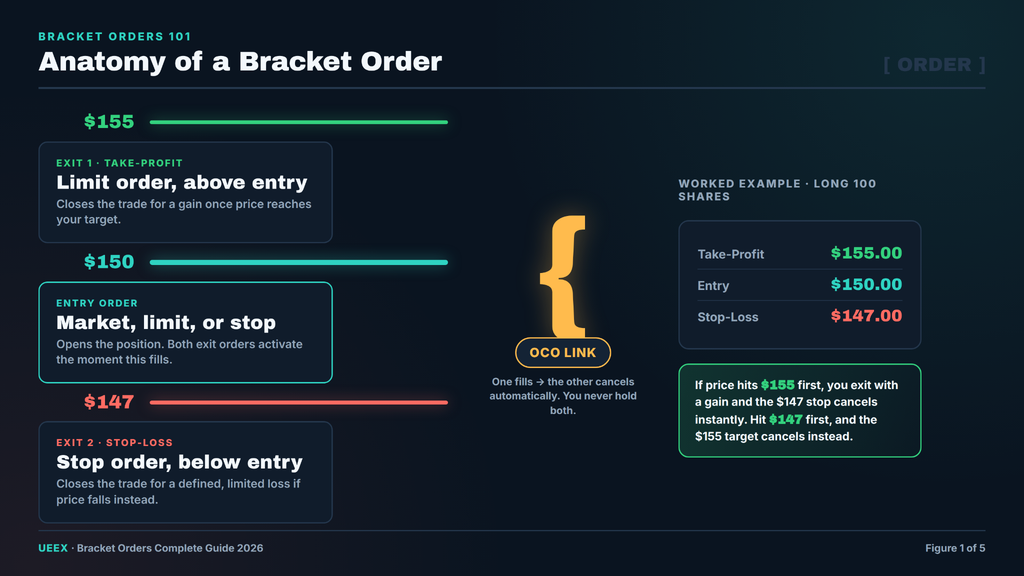
A bracket order is a single trade instruction made up of three linked parts: an entry order, a take-profit order, and a stop-loss order. Once you submit it, your broker handles the rest.
If the price hits your profit target, that order fills and the stop loss cancels. If the price hits your stop instead, that order fills and the profit target cancels. You never end up holding both.
Think of it like setting boundaries before you walk into a negotiation you know will be stressful. You decide your walk-away point and your ideal outcome ahead of time, so you’re not making that call in the heat of the moment.
The three parts work like this:
Entry order. This can be a market order, limit order, stop order, or stop-limit order, depending on how you want to get into the trade.
Take-profit order. A limit order is placed above your entry if you’re buying or below it if you’re shorting.
Stop-loss order. A stop or stop-limit order placed below your entry if you’re buying or above it if you’re shorting.
How the Mechanics Actually Work
When your entry order fills, the platform automatically submits the two exit orders as a linked pair. This linked pair is what’s known as an OCO group, short for “one-cancels-other.” Whichever side fills first cancels the other side instantly, so you’re never left holding a stop and a target on the same shares or contracts at the same time.
The order quantities always match across all three legs. If you buy 100 shares, your take-profit and stop-loss orders are both for 100 shares, unless you’ve built a scaling strategy on top of the basic bracket (more on that later).
Bracket Orders vs. Managing Trades by Hand
Doing this manually means placing your entry, waiting for the fill, placing your stop loss, placing your take-profit, and then watching the position so you can cancel the leftover order the moment the other one fills.
Miss that last step and you can end up with an unwanted position or an accidental short. A bracket order collapses all of that into one submission. In simple terms, bracket orders take automation one step further by combining an entry order with a built-in OCO exit strategy, packaging your entire trade logic into a single, coordinated action.
That single action matters most when you have several trades open at once or when you simply can’t stare at charts all day. It also keeps you from second-guessing a decision you already made with a clear head.
Types of Bracket Orders: OCO, OTOCO, and ATM Strategies
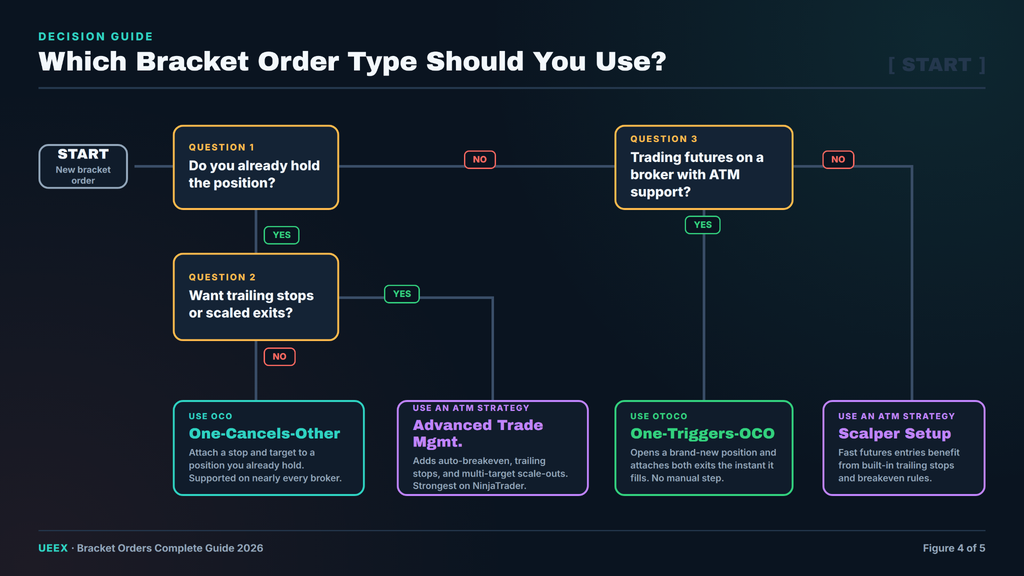
Not all brackets work the same way. The right one for you depends on whether you already hold a position, which broker you use, and how much automation you actually want.
OCO (One-Cancels-Other)
An OCO order links two exit orders, a stop loss and a take-profit, against a position you already own. You place these two orders together; when one fills, the platform cancels the other.
Example: You already own 100 shares of Apple at $150. You set an OCO with a take-profit at $155 and a stop-loss at $147. If the price reaches $155 first, you sell for a gain and the $147 stop disappears. If it drops to $147 first, you sell for a loss, and the $155 target disappears.
OCO is supported by most major brokers, including Interactive Brokers, Tastytrade, and NinjaTrader.
OTOCO (One-Triggers-One-Cancels-Other)
An OTOCO order builds the exits into the entry itself. You submit one order that opens the position, and the moment it fills, the take-profit and stop-loss orders go live automatically as an OCO pair.
Example: You want to buy Bitcoin at $62,000 with an automatic $65,000 take-profit and a $59,000 stop-loss, all set up before you ever hold the position.
This is what most people picture when they think of a true bracket order, because there’s no manual step between the entry filling and the protection going live. Tastytrade’s OTOCO orders aren’t available for shorting hard-to-borrow stocks since there’s no guarantee shares will be available to sell later. OCO still works in that situation because you’re managing a position you already hold.
There's no Call To Action with the ID #0.
ATM (Advanced Trade Management) Strategies
NinjaTrader takes bracket orders a step further with what it calls ATM strategies. These place your stop and target as an OCO pair the moment your entry fills, and they add features regular brackets don’t have:
Auto-breakeven, which moves your stop to your entry price once the trade has moved a set distance in your favor, so a winner can no longer turn into a loser.
Trailing stops, which follow the price as it moves in your favor and lock in more profit the further the trade runs.
Scaling out, which lets you take partial profit at more than one price level while the rest of the position keeps running.
According to NinjaTrader’s own documentation, one of the most popular ATM configurations is a simple bracket where a profit target and a stop-loss are placed together as an OCO group, with the trader free to layer trailing stops or breakeven rules on top.
Comparison at a Glance
Feature
OCO
OTOCO
ATM Strategy
Automates entry
No
Yes
Yes
Works on existing position
Yes
No
No
Trailing stops
No
No
Yes
Partial/scaled exits
No
No
Yes
Platform availability
Most brokers
Select brokers
NinjaTrader
Setup complexity
Low
Medium
Higher
Which One Should You Use?
Day traders generally want OTOCO or ATM strategies, since speed and full automation matter most.
Swing traders often do fine with OCO or OTOCO, depending on how they like to enter trades.
Scalpers benefit the most from ATM-style trailing stops, since they’re managing fast, small moves.
Crypto traders should check their platform carefully. Coinbase, for example, only offers bracket orders on its derivatives products, not on regular spot trades. More on that below.
If you’re weighing bracket orders against other execution tools, it’s worth reading our guide to popular algorithms in crypto trading to see how they fit into a broader plan.
How to Set Up Bracket Orders on Major Platforms
Every platform builds bracket orders a little differently. Here’s exactly how to place one on five of the most widely used trading platforms.
Interactive Brokers supports bracket orders across stocks, options, futures, forex, and crypto, and the setup is the same across asset classes.
Enter the ticker and click Buy (the background turns blue) or Sell (it turns red).
Enter your share quantity and choose LMT from the order type dropdown.
Set the limit price you’re willing to pay.
Adjust the Time-in-Force field if needed. You can choose a day order or Good-Til-Canceled (a buy or sell request that remains active until executed or manually canceled).
Click Advanced, then Attach, to reveal the bracket options.
Check the Bracket box. This automatically checks both the Profit Taker and Stop Loss fields.
Enter your profit-taker limit price and your stop-loss price.
Review and click Submit.
Example: According to Interactive Brokers’ own order documentation, a trader buying shares at $30.00 who expects a dip to $25.00 and a later rise back to $30.00 can attach a bracket so the exit levels are already set the moment the entry fills, with no need to come back and manage the position by hand.
One detail worth knowing: by default, IBKR offsets the bracket’s exit prices by 1.00 from your entry. You can change this in the order ticket or in your Global Configuration order presets, so don’t assume the defaults fit your strategy.
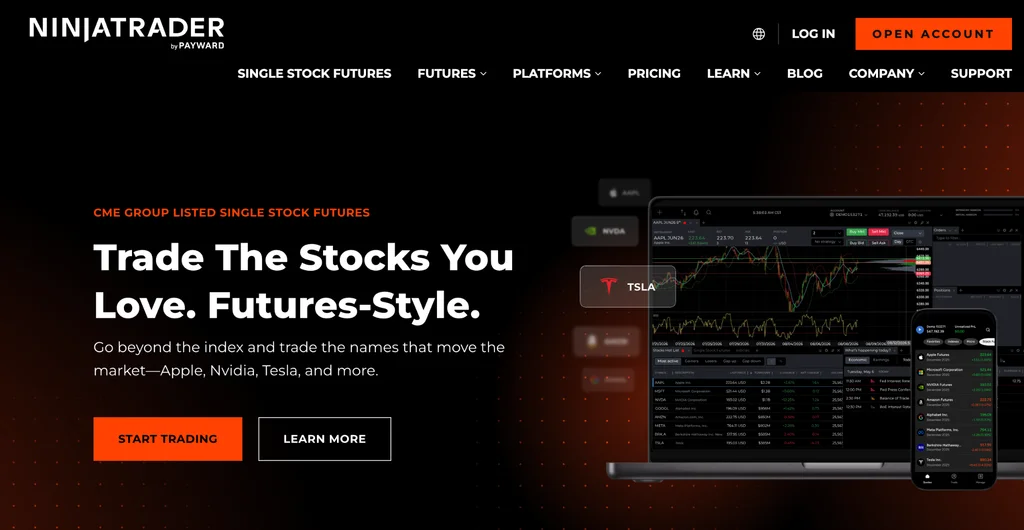
NinjaTrader is built around futures trading and is one of the few platforms with true ATM automation baked in.
Select your ATM strategy from the dropdown in the SuperDOM or Chart Trader window.
Set your stop-loss and profit-target distances (in ticks) in the strategy parameters.
Click Market, Buy, or Sell to place your entry.
Once the entry fills, the bracket submits automatically and appears in your SuperDOM.
For a Micro E-mini S&P 500 (MES) trade at 4500.00, a 12-tick stop and a 24-tick target give you a 1:2 risk-to-reward setup, small enough for most account sizes but wide enough to avoid getting shaken out by normal tick noise.
Its free plan supports simulated trading and charting; live trading and full commission discounts require a monthly plan (around $99/month) or a lifetime license (around $1,499), which drops per-contract commissions to some of the lowest in the futures industry.
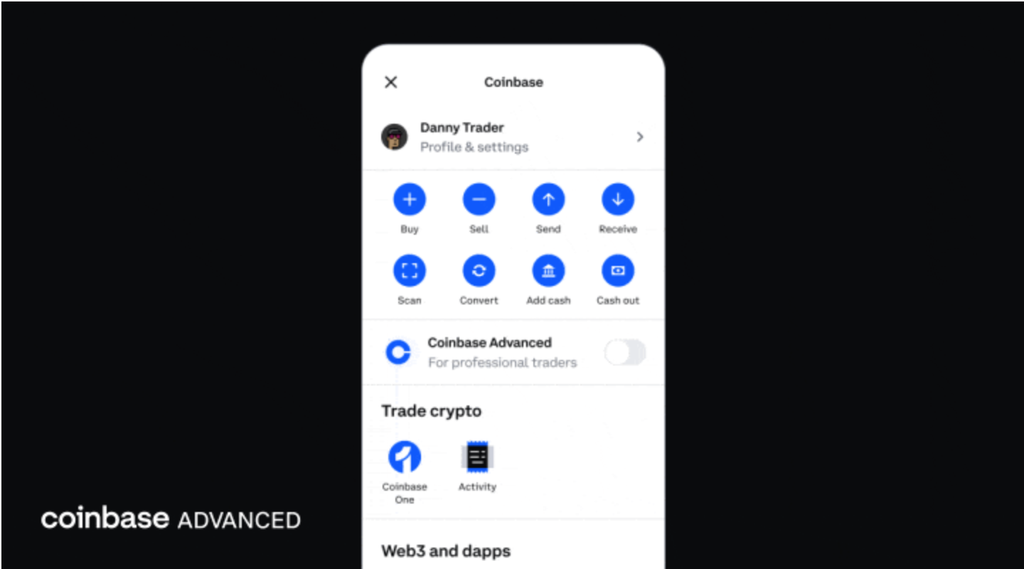
Coinbase’s bracket orders work a little differently than stock and futures brackets, and this trips people up. On Coinbase, bracket orders are reduce-only, meaning they close or shrink an existing derivatives position rather than open a brand-new one.
Open a position on a perpetual futures or expiring futures contract.
Select the bracket order type on the order form.
Set your take-profit price and your stop-loss price. The form shows your estimated profit and loss for each side before you submit.
Submit the order.
Example: You hold a long position of 1 BTC perpetual futures contract with an average entry of $62,000. You place a bracket to close that position, with a take-profit at $65,000 and a stop-loss at $59,000.
Here’s the part most guides skip: if the price hits your stop-loss level first, Coinbase’s order doesn’t just fill at that exact price. It flips into an aggressive limit order priced roughly 1.5% beyond the stop level for perpetuals, to help it actually get filled during a fast move.
If price keeps running past that adjusted limit, the order can stop filling, so it’s not a hard guarantee against slippage. Coinbase does not currently offer bracket orders for spot crypto trades, only for derivatives.
You can also stack multiple brackets against one position as long as the combined size doesn’t exceed what you’re holding. That lets you take profit in stages instead of all at once, which we cover in the strategies section below.
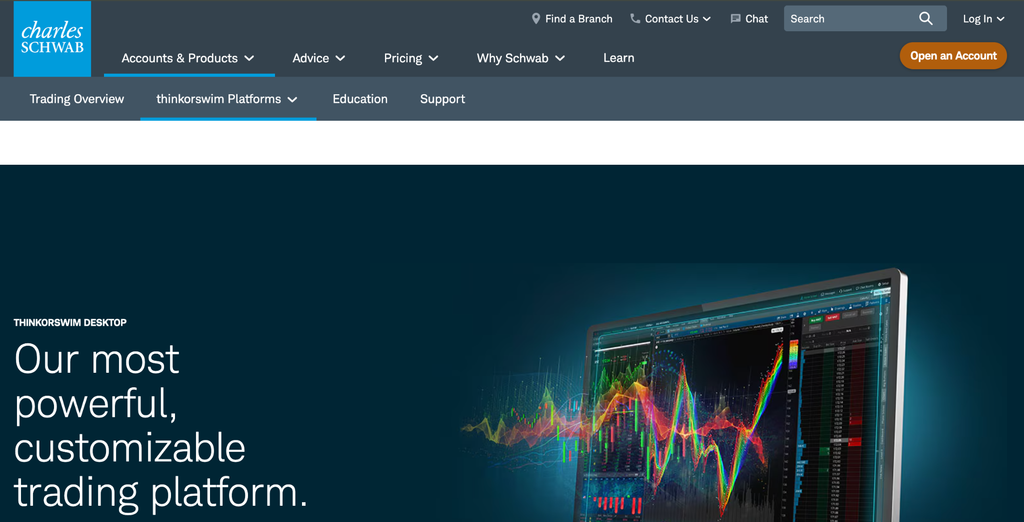
TD Ameritrade’s thinkorswim platform is now part of Charles Schwab following the 2023 merger, and it remains one of the most detailed order tickets available to retail traders.
From the Trade tab, select your symbol.
Choose Buy Custom or Sell Custom from the order menu.
Build your bracket by setting the entry order type and price, then adding the profit and stop legs.
Review the full order and confirm.
Schwab’sstop-limit documentation explains the difference clearly: a stop-limit order gives you a trigger price and a separate limit price, so you control the range you’re willing to trade in rather than accepting whatever price the market gives you once your stop is hit.
That protects you from a nasty fill during a fast-moving gap, though it also means your order might not fill at all if the price blows straight through your limit.
thinkorswim’s PaperMoney feature lets you build and test a bracket strategy with fake money before risking real capital, which is worth doing if you’ve never used the platform’s order ticket before.
Tastytrade offers both OCO and OTOCO, with a useful shortcut for people who don’t want to type in prices every time.
Switch to Table or Curve mode in the Trade tab.
Line up your position or order in the ticket.
Click the Bracket button in the bottom left corner of the order ticket.
Follow the setup prompts to enter your profit and stop levels.
You can also go into Settings and set default profit-target and stop-loss percentages by asset type (stock, options, or futures), so every new bracket starts pre-filled with your usual risk parameters.
Two limitations to know: tastytrade doesn’t support bracket orders for spot cryptocurrency, and OTOCO isn’t available when shorting hard-to-borrow stocks for the same share availability reason mentioned earlier.
Broker Comparison at a Glance
Broker
Asset Classes
OCO
OTOCO
Trailing/Advanced
Best For
Interactive Brokers
Stocks, options, futures, forex, crypto
Yes
Yes
Limited
Global, multi-asset traders
NinjaTrader
Futures
Yes
Yes
Full ATM suite
Futures traders, scalpers
Coinbase Advanced
Crypto derivatives
Yes (reduce-only)
No
Auto-flip to limit near stop
Crypto derivatives traders
Schwab (thinkorswim)
Stocks, options, futures
Yes
Yes
Moderate
Beginners, research-heavy traders
tastytrade
Stocks, options, futures
Yes
Yes
Default % templates
Options traders
Bracket Order Strategies That Actually Work
Setting up a bracket is the easy part. Deciding where to place the levels is what separates a strategy from a guess.
The 2:1 Risk-to-Reward Bracket
This is the simplest place to start. You risk one unit to make two.
Find your entry using support, resistance, or whatever setup you trade.
Set your stop-loss roughly 1% below entry (for a long position).
Set your take-profit roughly 2% above entry.
If your entry is $100, your stop lands near $99 and your take-profit near $102. The math behind this is what makes it worth using: with a 1:2 ratio, you only need to win 35% to 40% of your trades to come out ahead, which gives you real room for error.
A futures trader might apply this on the E-mini S&P 500 with a 12-tick stop and a 24-tick target, keeping the same ratio but scaled to tick size instead of percentage.
Loosen the ratio to 1.5:1 in choppy, high-volatility conditions where price needs more room to breathe, and widen it toward 3:1 in a slow, range-bound market where big moves take longer to develop.
Scaling Out in Stages
Instead of exiting an entire position at one target, you split it across several.
Example: You buy 300 shares of a stock at $150.
100 shares exit at $151 (roughly 1% gain)
100 shares exit at $153 (roughly 2% gain)
100 shares exit at $156 (roughly 4% gain)
All three share the same $148 stop-loss
This locks in partial profit early, which takes pressure off the rest of the trade, while still leaving room for a bigger move on the remaining shares. Coinbase allows this directly, as long as your combined bracket size doesn’t exceed your open position.
On Interactive Brokers, you’d submit three separate brackets with different profit targets. NinjaTrader’s ATM strategies handle this natively through multi-target OCO orders.
There's no Call To Action with the ID #0.
Trend-Following with a Wide Target
In a market that’s clearly trending, a tight stop and a wide target can make sense.
Stop-loss: 0.5% to 1% from entry
Take-profit: 3% to 5% from entry
Risk-to-reward: 1:3 to 1:5
Because the stop is tight, your win rate on this kind of setup tends to be lower, often 30% to 40%. The strategy still works because your winners are far bigger than your losers. Many traders move their stop to breakeven once the trade reaches roughly 1.5 times their initial risk and then let a trailing stop manage the rest of the exit.
Mean Reversion Brackets
This strategy bets that the price snaps back toward its average after stretching too far in one direction. Traders often use tools like Bollinger Bands and the Relative Strength Index (RSI) to spot when a price has moved to an extreme and is due for a pullback.
Because the goal is a return to the average rather than a breakout, the take-profit is usually close and the stop-loss moderate, often close to a 1:1 or 1.5:1 ratio. This approach tends to work best on liquid, range-bound assets like large index ETFs, where price has a habit of snapping back rather than trending indefinitely.
Common Bracket Order Mistakes
Alt text: Infographic listing six common bracket order mistakes, including stops set too tight, ignored slippage, assuming automatic OCO cancellation, and wrong position sizing, each paired with a short, practical fix.
Here are common bracket order mistakes to avoid
1. Setting Stops Too Tight
This is the single most common error. A stop placed too close to entry gets hit by ordinary price noise long before the trade has a real chance to work.
Fix: Base your stop distance on the asset’s Average True Range (ATR) rather than a flat percentage. If Bitcoin’s ATR is $2,000, a stop set $500 away isn’t protecting you from a bad trade; it’s just handing you a loss on normal movement. A stop set at 1.5 to 2 times ATR gives the trade room to breathe.
2. Underestimating Slippage
Bracket orders reduce the delays that come with manual order entry, but they don’t eliminate slippage. Slippage happens when there isn’t enough volume at your expected price to fill your full order, which is common during fast-moving news events or in thinly traded assets.
Fix: Use limit orders or stop-limit orders instead of market orders where possible, and be extra cautious trading in the first few minutes after the market opens or right around major news releases.
3. Forgetting That Not Every Broker Cancels Cleanly
Some platforms don’t support true OCO cancellation. If one leg of your bracket fills and the other isn’t automatically canceled, you can end up with a leftover order that fills later and puts you in an unintended position.
Fix: Confirm your specific broker cancels the opposite leg automatically before you rely on it, and get in the habit of checking your open orders at the end of each session.
4. Ignoring Market Hours and Gap Risk
A bracket set during regular trading hours doesn’t account for what happens overnight, especially around earnings reports or major economic data.
Fix: Use Good-Til-Canceled orders carefully, and consider widening your stop for any position you’re planning to hold through an earnings release or a weekend. Crypto brackets need a different mindset entirely, since crypto markets trade 24/7 and gaps can happen at any hour.
5. Over-Relying on Brackets in Fast, Thin Markets
In low-liquidity, low-float stocks that spike suddenly, a tight bracket can get stopped out purely from volatility, not because the trade thesis was wrong. Bracket orders work best for swing trades and day trades that play out over hours, not for chasing violent, illiquid spikes where price can gap straight through your levels.
Fix: Save bracket orders for setups with enough liquidity to fill near your intended price, and keep a mental stop as a backup plan for anything faster than that.
6. Getting Position Sizing Wrong
Your bracket quantity needs to match a position size you actually calculated, not a round number you picked out of habit.
Position size = Risk per trade ÷ (Entry price – Stop price)
Example: A $10,000 account risking 2% per trade has $200 at risk. If your entry is $100 and your stop is $98, that’s $2 of risk per share. $200 divided by $2 gives you a position size of 100 shares. Double-check that your bracket order quantity actually matches this number before you submit, since it’s an easy detail to overlook when you’re moving fast.
Bracket Orders by Asset Class
Alt text: Table comparing bracket order settings across stocks, crypto, futures, and options, covering volatility adjustment, optimal risk-to-reward ratio, typical stop-loss basis, and recommended trading platforms for each asset class.
Bracket orders work differently according to asset class and we’ll explore below
Stocks and ETFs
Set your entry near support or resistance, your stop below the recent swing low (or above the recent swing high for shorts), and your take-profit near the next resistance or support level.
Keep earnings dates and ex-dividend dates in mind, since both can create gaps that jump straight past a tightly placed bracket. This approach fits swing trades and multi-hour day trades better than fast scalps.
Futures
Futures brackets are measured in ticks, not percentages, since each contract has a fixed tick value. On the E-mini S&P 500, a tick equals 0.25 points. A 12-tick stop paired with a 24-tick target gives you a clean 1:2 setup.
Because futures trade nearly around the clock, remember to close or roll your bracketed position before contract expiration, and make sure you have enough margin for the full bracket, since overnight margin requirements typically run higher than intraday margin.
Cryptocurrency
Crypto’s round-the-clock trading and sharp volatility call for wider stops than you’d use on a stock, often 3% to 5% minimum. Stick with limit orders over market orders to avoid unnecessary slippage.
As covered above, Coinbase currently limits bracket orders to derivatives products, and the stop-loss leg switches to an aggressive limit order once triggered rather than guaranteeing an exact fill price.
If you’re trading altcoins instead of Bitcoin or Ethereum, expect wider spreads and higher slippage, and size your positions down accordingly.
Options
Not every broker supports bracket orders on options contracts; tastytrade, Interactive Brokers, and TradeStation are among those that do. A common structure is to set your stop-loss at a 50% loss of the premium paid and your take-profit at a 50% to 100% gain.
Buying a call for $5.00 in premium ($500 total), for example, with a stop at $2.50 and a target at $7.50, gives you a defined 1:1 risk-to-reward trade with a shorter expected holding time than a typical stock swing trade.
There's no Call To Action with the ID #0.
Tax Implications & Record Keeping
Bracket orders can create tax consequences when a stop-loss closes a position at a loss. For U.S. taxpayers, selling a security at a loss and buying a substantially identical security within 30 days before or after the sale can trigger the wash-sale rule. The loss is generally deferred and added to the cost basis of the replacement shares rather than immediately deducted.
Bracket Orders and Wash Sales
For example, you buy 100 AAPL shares at $150 and set a bracket stop at $148. If the stop triggers, you realize a $200 loss. Buying AAPL again five days later can trigger a wash sale, meaning the $200 loss is deferred.
To reduce the risk:
Wait until the 30-day window has passed before repurchasing the same or substantially identical security.
Consider a different security, but do not assume correlated ETFs are automatically safe. The IRS determines whether securities are “substantially identical” based on the facts.
Track purchases across accounts, including IRAs, because wash-sale rules can apply to substantially identical securities acquired there.
Remember that simply closing a bracket trade before the market closes does not create a special wash-sale exemption.
Record-Keeping Best Practices
Keep a complete record of every bracket trade, including:
Entry and exit times and prices
Stop-loss or take-profit trigger
Actual fill prices and slippage
Commissions and other trading costs
Position size and cost basis
Broker statements and tax forms
Your broker generally reports securities transactions on Form 1099-B, while individual sales are typically reported on Form 8949 and Schedule D unless you qualify for a different tax treatment.
Trader Tax Status and Mark-to-Market
Frequent trading does not automatically make you a professional trader for tax purposes. The IRS looks for substantial activity, continuity, regularity, and an intention to profit from daily market movements.
Qualifying traders can elect Section 475(f) mark-to-market accounting, which generally treats trading gains and losses as ordinary and removes the wash-sale rules for securities held in the trading business. For a 2026 election, the IRS says the election generally had to be made by the due date of your 2025 return, without extensions.
Because tax treatment can vary by account, security, and trading activity, consult a qualified tax professional before relying on these strategies. Most brokers, including Interactive Brokers and NinjaTrader, offer detailed trade history exports that make this far less tedious than tracking it by hand.
For broader context on protecting a portfolio outside of any single order type, our guide on crypto day trading strategies covers position sizing and daily loss limits that pair well with bracket orders.
Frequently Asked Questions
What is the difference between a bracket order and a regular order?
A bracket order links entry, stop, and target into one submission, whereas a regular order executes one instruction at a time. This allows the exit orders to go live automatically and cancel each other the moment one fills, saving you the manual effort of placing separate orders.
Do all brokers support bracket orders?
No, broker support for bracket orders is not universal across the industry. While Interactive Brokers, NinjaTrader, tastytrade, Schwab, and Coinbase Advanced support them, the exact mechanics like automatic OCO cancellation vary, so you must check your specific platform’s documentation.
Can I use bracket orders for options trading?
Yes, you can use bracket orders for options on platforms that explicitly support the feature. tastytrade, Interactive Brokers, and TradeStation are among the primary brokers that allow this; otherwise, you must submit stop-loss and take-profit legs manually after your entry fills.
What happens if my entry order doesn’t fill?
The exit orders will never activate if the initial entry leg remains unfilled. Since the take-profit and stop-loss are triggered by the entry execution, the entire bracket will simply expire or stay pending based on your time-in-force settings.
Disclaimer:This content is for educational purposes only and isn’t financial advice. Bracket orders don’t guarantee profits or prevent losses, and if your platform doesn’t fully support OCO cancellation, you can end up in an unintended position. Practice on a demo account before trading with real money, and talk to a qualified financial advisor before building a bracket order strategy around your own capital. UEEX makes no guarantees about trading outcomes and isn’t liable for any trading losses. Past performance never guarantees future results. By mastering bracket orders, you gain better control over your risk and take emotion out of your trading decisions.
Disclaimer: This article is intended solely for informational purposes and should not be considered trading or investment advice. Nothing herein should be construed as financial, legal, or tax advice. Trading or investing in cryptocurrencies carries a considerable risk of financial loss. Always conduct due diligence before making any trading or investment decisions.
Trade with proof of Reserves
UEEx publish monthly audits and third party verification on every listed market.