WordPress database error: [You have an error in your SQL syntax; check the manual that corresponds to your MariaDB server version for the right syntax to use near '' at line 1]SELECT * FROM wp_mica_ecta WHERE cta_id =
WordPress database error: [You have an error in your SQL syntax; check the manual that corresponds to your MariaDB server version for the right syntax to use near '' at line 1]SELECT * FROM wp_mica_ecta WHERE cta_id =
WordPress database error: [You have an error in your SQL syntax; check the manual that corresponds to your MariaDB server version for the right syntax to use near '' at line 1]SELECT * FROM wp_mica_ecta WHERE cta_id =
WordPress database error: [You have an error in your SQL syntax; check the manual that corresponds to your MariaDB server version for the right syntax to use near '' at line 1]SELECT * FROM wp_mica_ecta WHERE cta_id =
You hit send on a $5,000 USDT transfer. The fee left your balance right away. However, forty-eight hours later, the money is not in your wallet, and it never showed up at the other end. The block explorer just says “pending,” with no time estimate at all.
If this is you, take a breath. Most failed crypto transactions are not lost forever. They are stuck, reverted, or sent to the wrong place, and each of those problems has a fix. This guide walks through why transactions fail, how to recover them step by step, and how to make sure it never happens again.
There's no Call To Action with the ID #0.Key Takeaways
- Act fast. Address a stuck transaction within the first hour if you can and a wrong network deposit within 24 hours. The odds of recovery drop the longer you wait.
- Prevention beats recovery. Sending a small test transaction first, double-checking the network, and keeping enough native coin for fees stops most problems before they start.
- You can often fix it yourself. If you hold your own wallet keys and both networks run on Ethereum’s EVM standard, you can usually move the funds back without paying anyone.
- Exchanges are not all equal. Coinbase runs a self-service recovery tool with a flat fee. Binance and others handle it through support tickets, and pricing and speed vary a lot.
- Blockchains do not have an undo button. Once a transaction is confirmed, it is final. That is the whole point of the technology, so always check twice before you click send.
What Does a “Failed” Crypto Transaction Actually Mean?
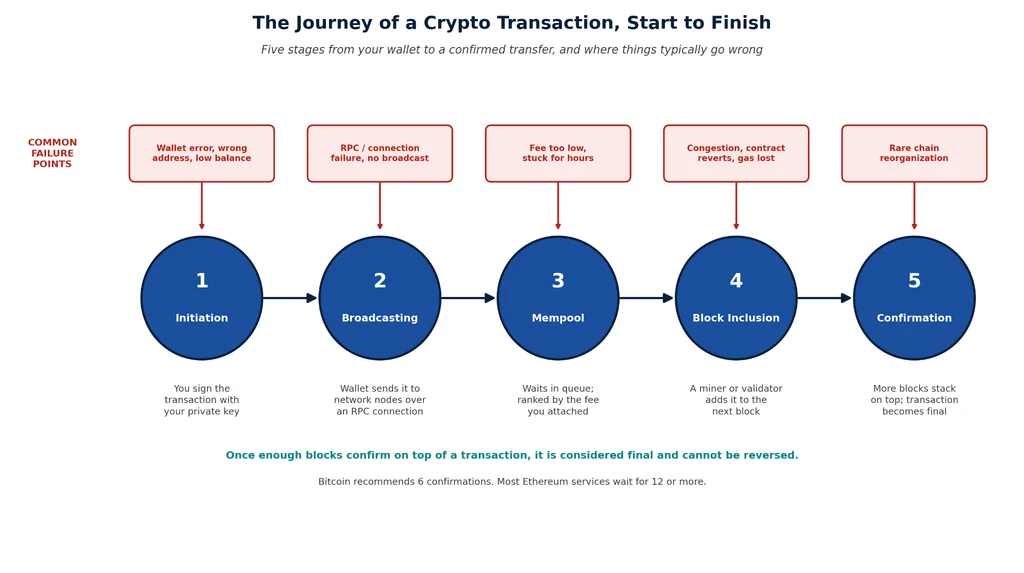
“Failed” gets used for three very different situations, and knowing which one you are in changes everything about how to fix it.
1. Pending or Unconfirmed: This is the most common case. Your transaction was sent out to the network but has not been picked up and added to a block yet.
It is sitting in a waiting room called the mempool, and miners or validators are choosing which transactions to process based on the fee attached. This is almost always recoverable. It either clears on its own once network traffic eases, or you can pay more to speed it up.
2. Failed or Reverted: The transaction did get processed, but the smart contract behind it rejected the action, usually a token swap, a stake, or a claim. Your funds stay in your wallet, but the network fee you paid is gone for good, because the computing work still happened even though the action did not go through.
3. Dropped or Rejected: The transaction never made it onto the blockchain at all. A node rejected it before it even reached the mempool, often because of a fee that was too low or a sequencing error. Your funds never left your wallet, so there is nothing to recover here beyond simply trying again.
Before you do anything else, look your transaction up on a block explorer. For Bitcoin, use mempool.space. For Ethereum and other EVM chains, use Etherscan, BscScan, or PolygonScan depending on the network.
That single lookup tells you which of the three situations you are actually dealing with, which decides everything that comes next. Understanding this also depends on knowing basic terms like gas, nonce, and confirmations.
If any of this is new to you, our blockchain basics guide is a good place to start before diving into recovery steps.
Why Crypto Transactions Fail: The Main Causes
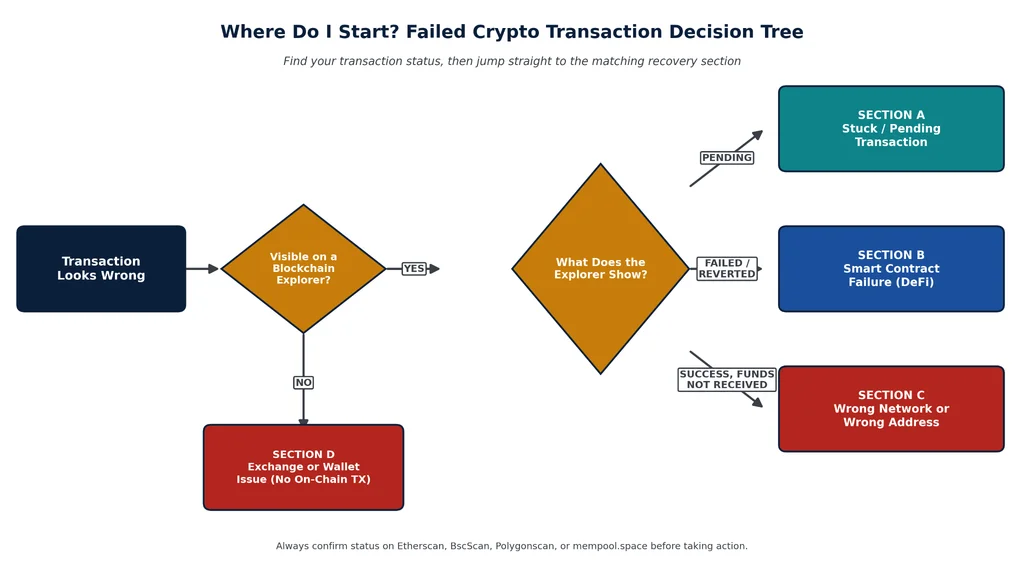
Most failures trace back to a handful of repeat offenders. Here are the ones you will run into most often.
1. The Fee Was Too Low
Miners and validators process the highest-paying transactions first. If you set your fee too low during a busy period, your transaction can sit unprocessed for hours or even days. This is especially common on Bitcoin and Ethereum during high-demand events, like a popular NFT mint or a sharp price swing that sends everyone trading at once.
You can check current network conditions before you send anything. Etherscan’s Gas Tracker shows live Ethereum fee levels, and the mempool space shows Bitcoin’s fee market and how backed up the network is. Our guide to gas fees breaks down how these fee markets actually work if you want the full picture.
2. Network Congestion
Sometimes even a reasonable fee is not enough, because the entire network is jammed. This happens during major token launches, big market moves, or outages.
Bitcoin’s mempool can swell past 100 MB of unconfirmed transactions during busy stretches, and Ethereum has seen gas prices spike far above normal levels during high-demand events like popular NFT drops.
For instance, Solana suffered a well-documented 18-hour outage in February 2023 that halted transactions network-wide.
There's no Call To Action with the ID #0.3. Wrong Network Selected
This is the single most common cause of “my crypto disappeared” panic. USDT alone exists on more than ten different networks: Ethereum (ERC-20), Tron (TRC-20), BNB Smart Chain (BEP-20), Polygon, and others.
Send USDT over the Tron network to an address that only expects the Ethereum version, and the coins do not vanish; they just land somewhere your receiving platform cannot see them yet.
If you control the private keys to the receiving wallet, a wrong network deposit is almost always fixable. The tokens exist on a real blockchain. You just need to add that network to your wallet and look for them there.
4. Wrong Wallet Address
A mistyped or swapped address is the scariest failure mode, because it is often permanent. If the address is invalid, the transaction simply will not go through, and your funds stay put.
But if it is a valid address that just is not the one you meant to use, that transaction is final the moment it confirms. There is no support ticket that reverses a blockchain.
Address poisoning scams make this worse. Scammers send tiny amounts from addresses that look almost identical to ones you have used before, hoping you copy the wrong one from your transaction history by mistake. Always check the full address, not just the first and last few characters.
5. Smart Contract Reversion
Trading on a decentralized exchange or interacting with a DeFi protocol involves a smart contract, and contracts have rules. If the price moves past your slippage setting, if a liquidity pool cannot cover your trade size, or if you never approved the contract to spend your tokens; the transaction reverts. Your tokens stay in your wallet. The gas fee does not.
6. Nonce Problems on Ethereum
Every Ethereum wallet keeps a running count of transactions called a nonce, and transactions must confirm in order. If you send from the same wallet on two devices at once, or a transaction gets stuck, everything after it in the queue waits too, no matter how high a fee those later transactions offer.
7. Exchange Side Delays
Sometimes there is no blockchain problem at all. Your withdrawal shows “processing” on the exchange, but no transaction hash has been generated yet. This usually means the exchange itself is holding the request, often for a security review on a large amount, a first-time withdrawal address, or a temporarily empty hot wallet waiting to be refilled from cold storage.
8. Not Enough Native Coin for Fees
You need a small amount of the network’s own coin to pay for any transaction, even if you are only sending a different token. Trying to send all of your USDT on Ethereum without leaving any ETH behind for gas will simply fail before it starts.
9. Connection or RPC Errors
Wallets talk to the blockchain through a service called an RPC endpoint. If that connection drops, your app crashes, or you lose internet mid-signature, the transaction may never broadcast at all. Nothing is lost here since it never left your wallet, but it can be confusing when your balance briefly looks wrong.
10. Missing Token Approval
Before a DeFi platform can move your ERC-20 or BEP-20 tokens, you have to give it permission first, in a separate transaction called an approval. Skip that step and your swap or stake attempt fails, and you pay gas for the failed attempt on top of it.
11. Cross-chain Bridge Failures
Bridges move assets between blockchains using their own smart contracts and, often, a set of outside validators. When a validator goes offline or a bridge contract pauses, funds can sit locked on one side for hours or days.
Bridge failures have caused some of crypto’s largest losses, including the Ronin Bridge hack in 2022, so stick to well-known, audited bridges and never bridge large amounts on your first try.
12. Double Broadcasting
Rare, but it happens: sending two transactions from the same wallet that both try to spend the same coins. The network accepts the first one and rejects the second. Nothing is lost; the second transaction simply needs to be resent.
There's no Call To Action with the ID #0.How to Recover a Stuck or Pending Transaction
Here are the recovery processes for different crypto transactions
Recovering a Stuck Bitcoin Transaction
Step 1: Check the status: Paste your transaction ID into the mempool site. If it shows “unconfirmed,” it is sitting in the mempool waiting.
Step 2: Compare your fee to the current market: The Mempool site shows you where your fee ranks against everyone else waiting. If you are near the bottom, you are likely stuck until conditions ease or you take action.
Step 3: Use Replace-By-Fee (RBF) if it is enabled: Wallets like Electrum, Sparrow, and most hardware wallet apps let you resubmit the same transaction with a higher fee, which replaces the old one in the queue. Look for a “bump fee” or “increase fee” option next to the pending transaction.
Step 4: Use Child-Pays-For-Parent (CPFP) if RBF was not enabled: You create a new transaction that spends the stuck, unconfirmed output and attach a high fee to it. Miners are incentivized to confirm both transactions together to collect the combined fee.
Step 5: Try a transaction accelerator as a last resort: Services like the one from ViaBTC offer free or paid help pushing a stuck transaction through, though free slots are limited and not guaranteed.
Step 6: Wait it out: Most nodes eventually drop transactions with fees that are far too low, usually within a couple of weeks. Once dropped, your funds return to your wallet automatically, and you can resend with a proper fee.
Recovering a Stuck Ethereum or EVM Transaction
Step 1: Check the status on Etherscan (or BscScan, PolygonScan, and so on, depending on the network you used).
Step 2: Open your wallet’s activity list: In MetaMask or Trust Wallet, find the pending transaction.
Step 3: Speed it up: Tap “Speed Up” and let the wallet suggest a higher gas price, or set it manually based on the current “fast” rate shown on Etherscan’s gas tracker.
Step 4: Cancel it instead, if you would rather not send it at all: This works the same way, sending a zero-value transaction with the same nonce but a higher fee, which clears the slot without completing the original action.
Step 5: Fix a stuck nonce manually if that is the real problem: Advanced wallet settings let you set a custom nonce so you can replace a specific stuck transaction directly, rather than waiting for it to clear on its own.
Recovering a Failed or Reverted DeFi Transaction
The good news first: if a swap, stake, or claim reverted, your tokens are still in your wallet. Only the gas fee is gone.
- Open the transaction on the block explorer and check the error message. Common ones include “insufficient output amount” (your slippage setting was too tight), “transfer from failed” (you skipped the approval step), and “insufficient liquidity” (the pool cannot cover your trade size).
- Fix the specific problem: raise your slippage tolerance a little, complete the missing token approval, or split a large trade into smaller pieces.
- Retry the transaction with the corrected settings.
If the error mentions a paused contract or the project’s own announcements point to an exploit, do not retry. Check the project’s official channels before sending anything else.
Read Also: Role of Cryptocurrency in Cross-Border Transactions
Recovering Crypto Sent to the Wrong Network
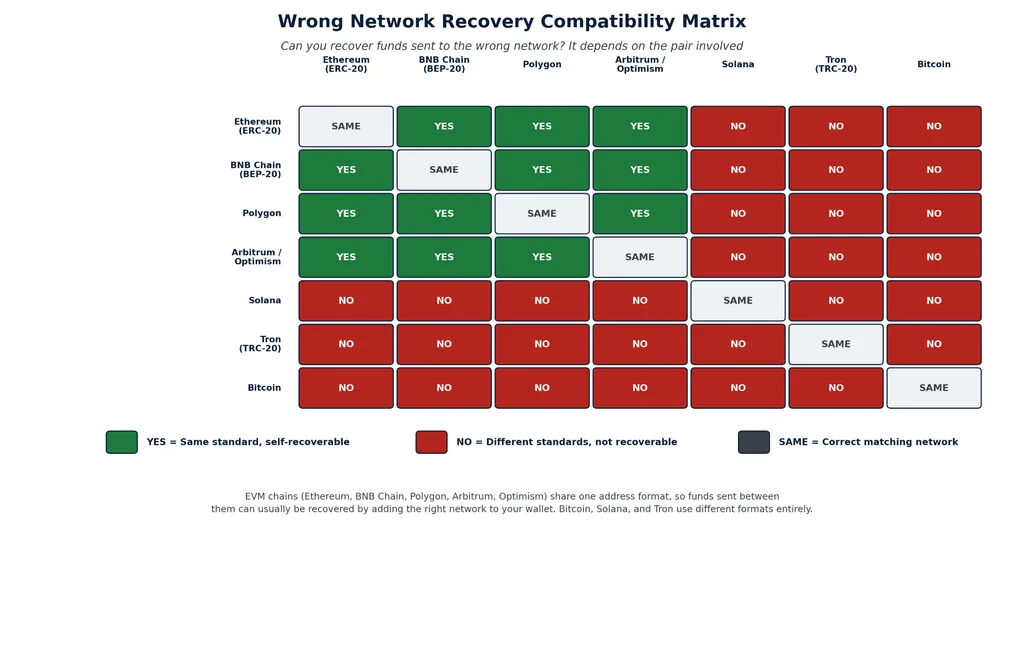
This is the scenario that causes the most panic, and it is usually fixable if you hold your own wallet keys.
If it landed in your own non-custodial wallet
Say you meant to send USDT on Ethereum, but it actually went out over BNB Smart Chain to your MetaMask address. Your wallet address is the same across EVM networks, so the coins are not lost; your wallet just is not looking at the right network yet.
- Open MetaMask and add the BNB Smart Chain network manually (Settings, then Add Network).
- Switch to that network. Your address stays identical.
- If the token balance does not show automatically, import it manually using its official contract address.
- From there, you can use the funds directly on that network or bridge them back to your intended chain.
Trust Wallet and most other software wallets work the same way; just switch networks from the dropdown menu.
If it landed on an exchange
This depends entirely on the exchange’s policy, and policies vary a lot. See the platform guide below.
A wrong network deposit is not the same as a lost one. The coins exist on a real, working blockchain. The only question is whether the wallet or platform holding your address can see and release them.
Recovering From an Exchange Withdrawal Stuck on “Processing”
If your withdrawal shows “processing” but there is no transaction hash yet, this is happening on the exchange’s side, not the blockchain’s. There is nothing to speed up on a block explorer because nothing has been broadcast.
- Check the exchange’s status page for wallet maintenance on that specific asset or network. Binance publishes updates at status.binance.com, and Coinbase does the same at status.coinbase.com.
- Understand what typically causes the hold: manual security review on large amounts, a new withdrawal address that needs a whitelist period, or a hot wallet waiting to be refilled from cold storage.
- If it has been more than a day or two, contact support with your withdrawal ID, the exact amount, the destination address, and a timestamp.
Exchange Recovery Policies, Platform Examples
Recovery policy is one of the biggest differences between exchanges, and it is worth knowing before you deposit anywhere. If you have not settled on an exchange yet, our guide to choosing the right exchange covers more than just fees and coin listings.
UEEx
Source: ueex.com
UEEx’s official recovery guidance states that its technical team can attempt to recover deposits sent using the wrong currency or blockchain network. The service costs 100 USDT, paid in advance, with recovery attempts taking up to 15 business days. If recovery is unsuccessful, the fee is refunded.
UEEx also addresses losses linked to confirmed platform technical problems or system-verified market anomalies. Users should report abnormal events promptly so its support team can verify the transaction and platform data. Because recovery depends on the specific circumstances, users should contact official support rather than assume compensation applies.
Coinbase
Source: Pinterest
Coinbase runs the most user-friendly system in the industry: a self-service asset recovery tool that covers certain unsupported assets and networks like Ethereum, BNB Smart Chain, and Polygon.
Eligible recoveries are sent to a self-custodial wallet, and recoveries valued above $100 incur a 5% fee on the amount exceeding $100, plus applicable network fees. Recovery availability depends on the specific asset and network.
Note that funds sent to an unknown or incorrect blockchain address generally cannot be recovered. Users should also protect their login credentials and 2FA, as Coinbase warns that it cannot retrieve crypto sent off-platform.
Binance
Source: binance.com
Binance does not offer a self-service tool. Wrong-network and unsupported-token recoveries go through a support ticket, and Binance has been open that recovery is offered at its discretion rather than guaranteed.
Fees for this kind of manual recovery have varied significantly over time based on Binance’s own published support communications, so always check the current fee before assuming what it will cost, and expect the process to take longer than Coinbase’s automated tool.
Across every exchange, the pattern is the same: the earlier you flag the problem and the more documentation you provide (transaction ID, exact amount, source, and destination network), the faster and cheaper the resolution tends to be.
Advanced Recovery for Technical Users
A few situations call for more hands-on tools:
1. Manual RPC broadcasting: If a wallet app keeps failing to broadcast a valid transaction, developers can rebroadcast it directly through a library like ethers.js or a node’s own RPC interface.
2. Private key export: If tokens landed on the wrong EVM network and your current wallet does not support it, you can export your private key and import it into a wallet that does, like Trust Wallet. Do this only on a device you trust, and treat the key as compromised afterward since it has now been exposed outside your original wallet.
3. Checking contract state before retrying: Etherscan’s “Read Contract” tab lets you check whether a DeFi contract is paused or whether a liquidity pool can actually support your trade before you spend gas finding out the hard way.
4. Bridge explorers: Tools like LayerZero Scan and the Axelar Explorer let you track a cross-chain transfer stage by stage, so you know whether the hold-up is on the source chain, the relayer, or the destination chain.
When to Accept the Loss
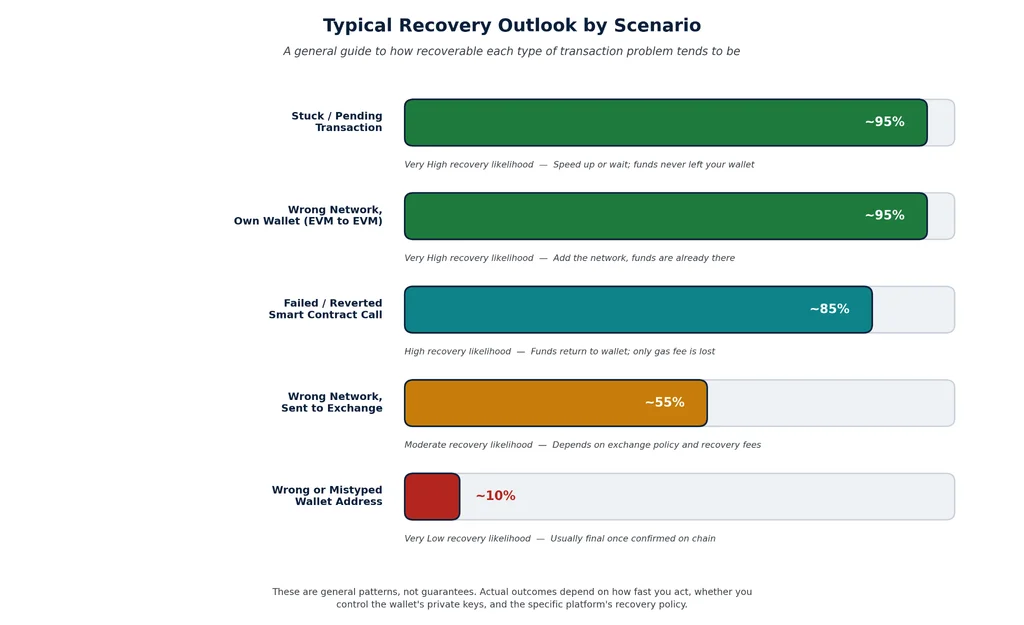
Not every situation has a fix, and it is worth being honest about that early rather than chasing something that will not resolve.
Funds are usually unrecoverable when:
- They were sent to an address format that does not exist on the receiving chain at all, like a Bitcoin-style address on an EVM network.
- The receiving exchange has no recovery policy for that specific scenario and declines to help.
- The destination was a stranger’s wallet with no way to contact them.
- A smart contract was exploited, or the project was rugged before your funds could move.
Before spending hours chasing a recovery, do a quick gut check. If you lost $50 and the recovery fee would be $40, it is probably not worth pursuing. If you lost $20,000, it almost always is.
Blockchain immutability is what makes this technology trustworthy for everyone else using it. It is also exactly why there is no support line that can undo a confirmed transaction. Treat a mistake like this as an expensive lesson, not a reason to stay away from crypto altogether.
Prevention: How to Avoid This Next Time
Recovery is stressful. Prevention takes thirty seconds. These habits stop the vast majority of transaction failures before they start, and they pair well with the broader crypto security best practices we cover in more depth elsewhere on the blog.
- Send a small test transaction first, especially to a new address or for any transfer over a few hundred dollars. A $10 test that clears successfully is cheap insurance against losing thousands.
- Triple-check the network before you withdraw. Confirm what network the destination actually supports, and match it exactly. ERC-20, BEP-20, and TRC-20 are not interchangeable, even for the same coin.
- Verify the full address, not just the first and last few characters. Address poisoning scams rely on you skimming instead of reading carefully.
- Set a fee that matches how urgent the transfer is. Check Etherscan’s gas tracker or mempool.space before sending anything time-sensitive, and pay a little more if speed matters.
- Keep a small amount of the network’s native coin on hand at all times, even if you mainly hold other tokens. You cannot pay gas with a token that is not the native coin.
- Check for maintenance windows on both the sending and receiving platforms before moving large amounts.
- Read your wallet’s confirmation screen every single time. It shows the amount, the network, and the recipient before you sign, which is your last chance to catch a mistake.
- Use a hardware wallet for large holdings. A hardware wallet forces you to physically confirm every transaction on a secure screen, which blocks most malware-based attacks entirely.
- Bookmark exchange login pages and never click a login link from an email. Phishing sites that mimic real exchanges are extremely common.
- Set slippage sensibly on DeFi trades. Around 0.5% for stablecoins, higher for more volatile pairs, so your trade does not fail the moment the market moves.
Final Thoughts
Failed transactions are part of learning how crypto works, not a sign that something is broken. The technology processes millions of successful transfers every single day.
Chainalysis’s 2026 Crypto Crime Report puts illicit activity at less than 1% of all attributed on-chain transaction volume, which gives you a sense of scale: the overwhelming majority of what happens on these networks, including the failures, is ordinary people moving ordinary money, running into an ordinary hiccup along the way.
Stay calm, look up your transaction, work through the right recovery path for your situation, and build the prevention habits above into how you use crypto going forward. Most of the time, your money is not gone. It is just waiting for you to do the next step.
Frequently Asked Questions
Can I cancel a crypto transaction after I’ve sent it?
Only while it is still unconfirmed and sitting in the mempool. On Ethereum and other EVM chains, you can cancel it by sending a zero-value transaction with the same nonce and a higher fee. On Bitcoin, this only works if Replace-By-Fee was enabled when you sent it. Once a transaction is confirmed, it cannot be canceled or reversed by anyone, including the exchange or wallet provider.
How long should I wait before considering a transaction failed?
Check the status on a block explorer rather than guessing by the clock. Bitcoin transactions with a reasonable fee usually confirm within a few hours; Ethereum transactions typically confirm within minutes unless the network is congested. If a transaction has been pending for more than 24 hours with no movement, it is time to look into speeding it up or replacing it.
Why did I lose my gas fee even though the transaction failed?
Gas pays for the computing work the network does to attempt your transaction, not for a guaranteed successful outcome. When a smart contract reverts your transaction, for example, because of a slippage limit or a failed condition, the network still did the work to evaluate and reject it, so the fee is still owed.
Can anyone reverse my transaction once it’s confirmed?
No. Not the developers, not the exchange, not even the network’s own validators. This is the core feature of blockchain technology: once enough blocks confirm on top of a transaction, changing it would require rewriting the entire chain after that point, which is effectively impossible on any major network. This is exactly why prevention and careful double-checking matter so much more in crypto than they do with a traditional bank transfer.
Disclaimer: This article is for educational purposes only and is not financial or legal advice. Cryptocurrency transactions carry real risk of permanent loss. The recovery steps in this guide reflect common, documented paths to resolution, but success is not guaranteed in every case, and some losses cannot be undone.